This post isn’t about vendor-bashing. With attacks against Active Directory Certificate Services (ADCS) increasing, I want to show how certain vendor-required settings create real risk. Some products ask for certificate template permissions that amount to ESC1: Domain Users can request certificates that grant elevated privileges and pivot to Domain Admin in a few steps. Another example is an ESC1-style template that lets a specific service account enroll. If that account can request client auth certificates or set alternate subject names, your Tier 0 might be expanding that you weren’t aware about.
1. Citrix Endpoint Management
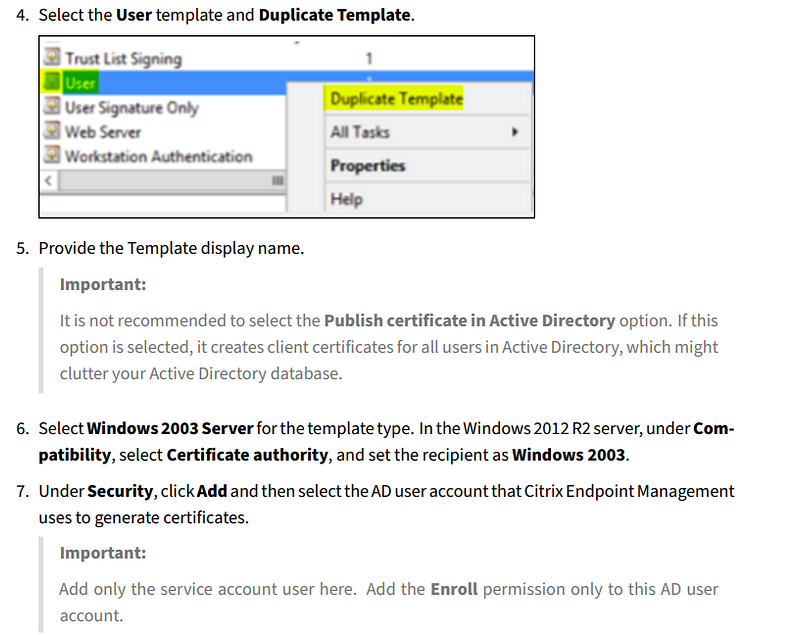
The first example is Citrix Endpoint Management. In their guide, they walk through configuring a CA template: duplicate the built-in User template, add the Citrix service account, grant it Enroll permissions, enable Supply in the request, and then publish the certificate in Active Directory. This is documented here: Citrix Endpoint Management™
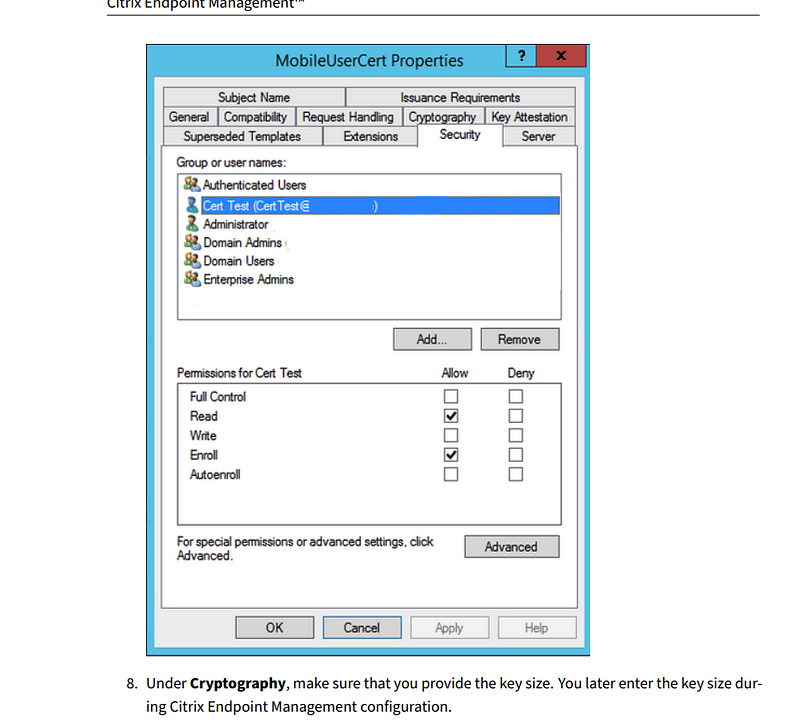
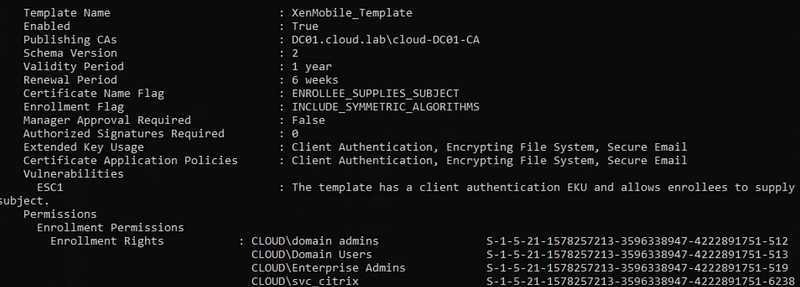
Once we duplicated the User template and added the Citrix Endpoint Management service account with Enroll, this is how the default ACL looked.
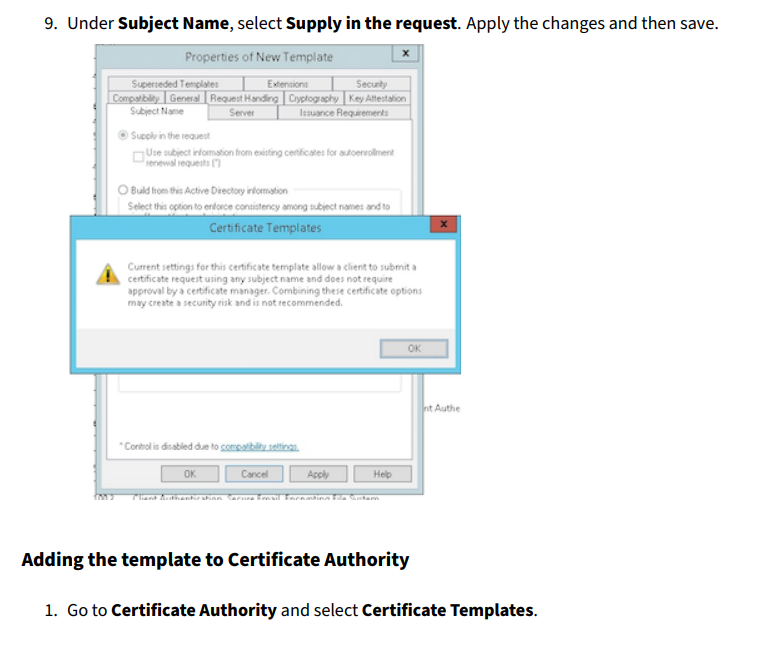
In the next step, the guide explicitly asks you to enable Supply in the request.
As shown, you need to publish the template to AD.
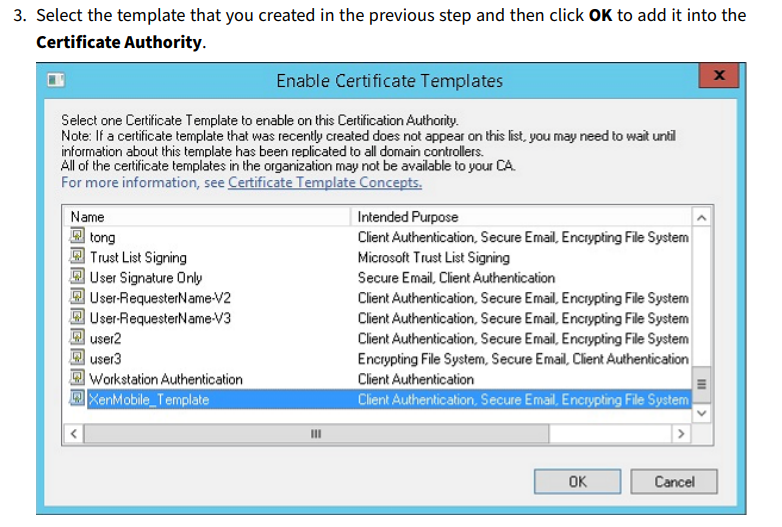
The risk is that the Citrix Endpoint Management service account now has to be handled as Tier 0. In addition, duplicating the User template leaves Domain Users with default Enroll permissions. If you keep those defaults, Domain Users can leverage ESC1 to reach Domain Admin.
Update: After I emailed Citrix, they updated their guidance to explicitly state that Enroll permissions should be removed from Domain Users and granted only Read/Enroll to the service account.
2. Workspace ONE UEM
Workspace ONE UEM uses a Microsoft Enterprise CA (AD CS) over DCOM to issue identity certificates to users or devices. UEM installs those certificates via profiles and they are used for authentication to corporate services like Wi-Fi 802.1X, VPN/Tunnel, email, and apps. The DCOM integration lets UEM request, renew, and revoke certificates directly from AD CS. This is documented here: AD CS Via DCOM (Last updated in 2025, so documentation should be up-to-date)
I also found posts from other IT pros saying the same thing, with clearer step-by-step instructions and screenshots for configuring the certificate template. How to distribute Active Directory user certificates with Workspace ONE UEM — CloudWorkSpace.blog
The official docs say to start by duplicating the User template.
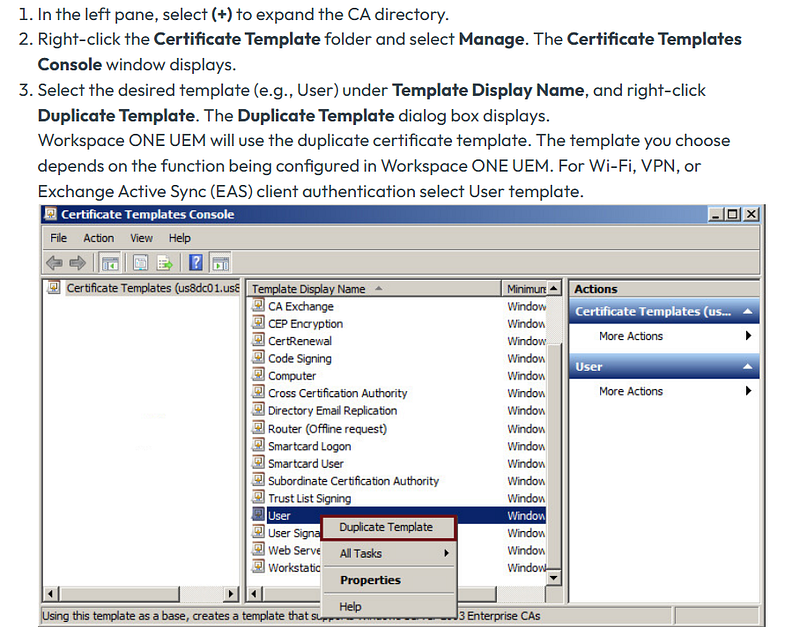
The instructions explicitly tell us to enable the Supply in the request checkbox.
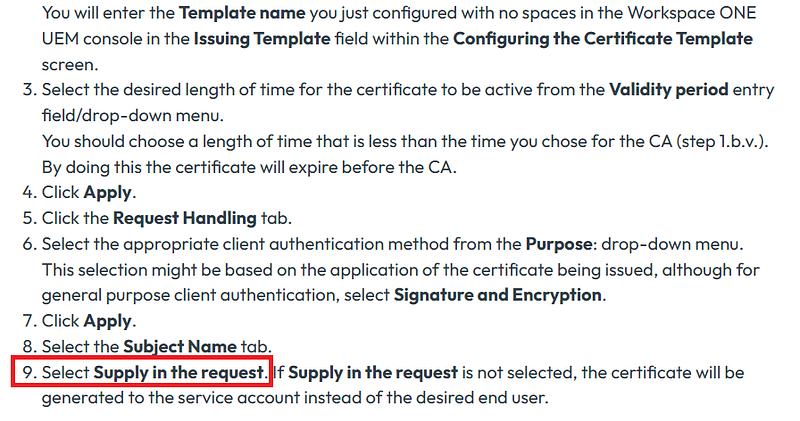
The next steps instruct you to enable Client Authentication and give the service account Enroll permissions.
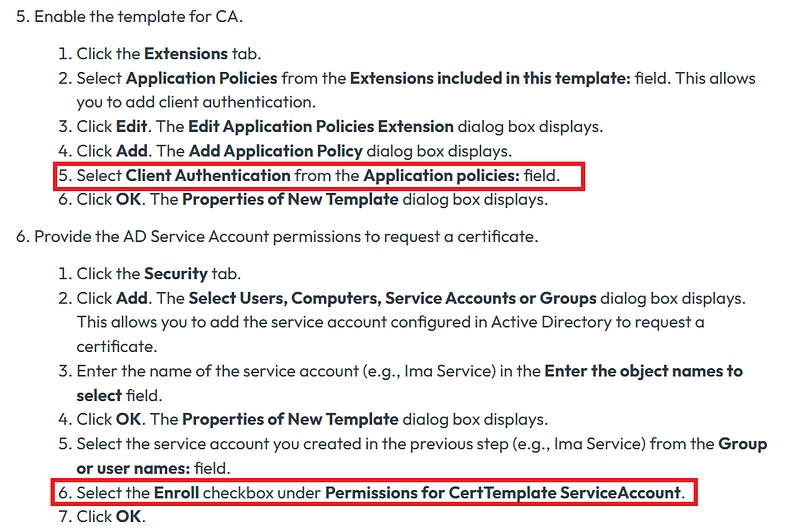
With the default template, both the service account and Domain Users can enroll. If you leave it as is, any Domain User can use an ESC1 path to reach Domain Admin.
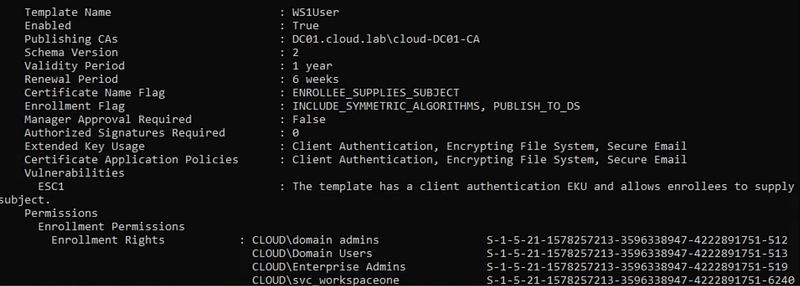
3. Oracle Mobile Security Suite (OMSS)
Oracle Mobile Security Suite (OMSS) is an enterprise mobility platform that manages devices and a secure “Workspace” app so users can access corporate resources safely. OMSS uses Microsoft AD CS via NDES/SCEP to issue client identity certificates during device/workspace enrollment. Those certs are used by OMSS to authenticate the device/user to corporate services. The guide says this NDES/SCEP setup and a dedicated template is required for Secure Workspace enrollment. This is documented here: mobad.book
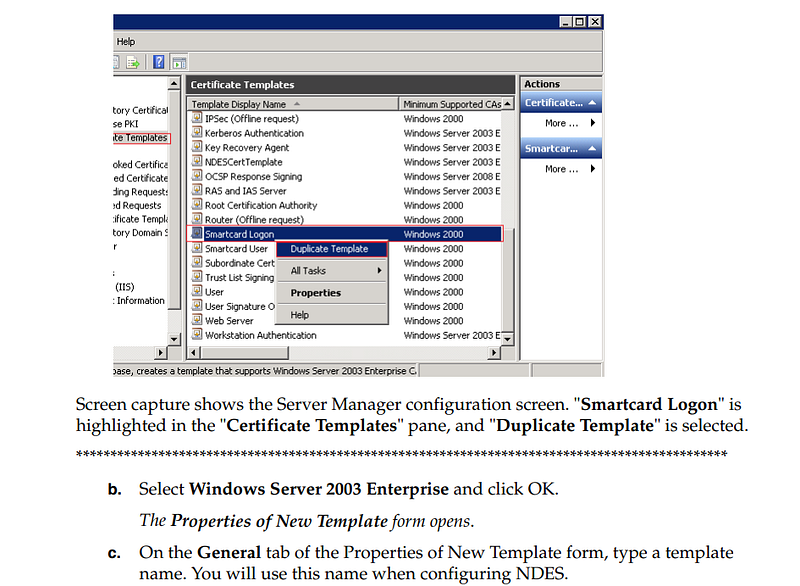
The document says to begin by duplicating the Smartcard Logon template and naming it something like NDESCertTemplate.
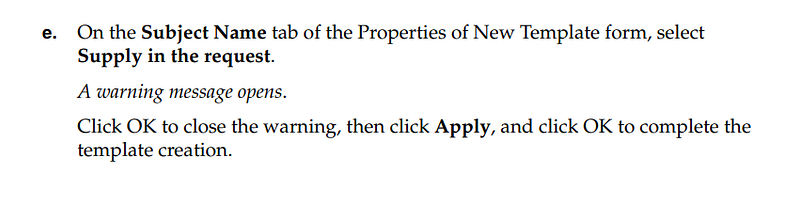
The guide further asks you to turn on Supply in the request.
The most surprising part: it instructs granting Authenticated Users Read, Write, Enroll, and Autoenroll on the template.
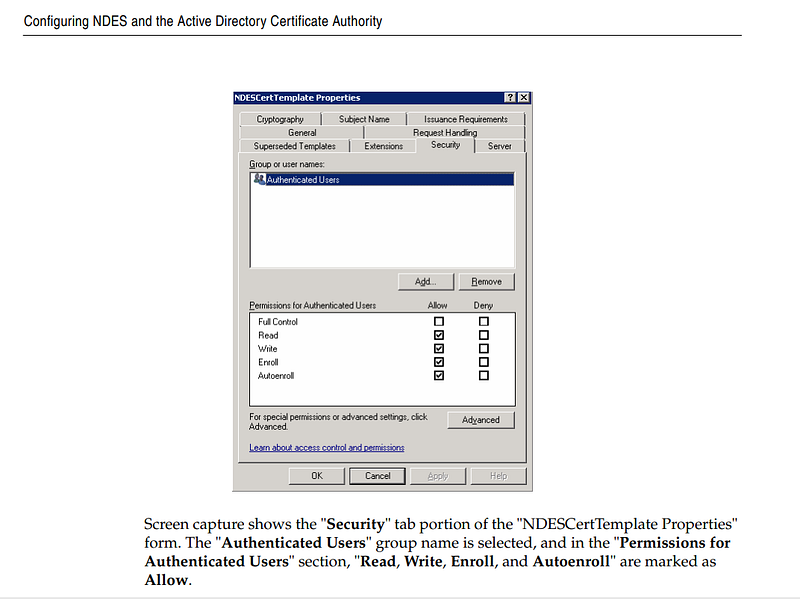
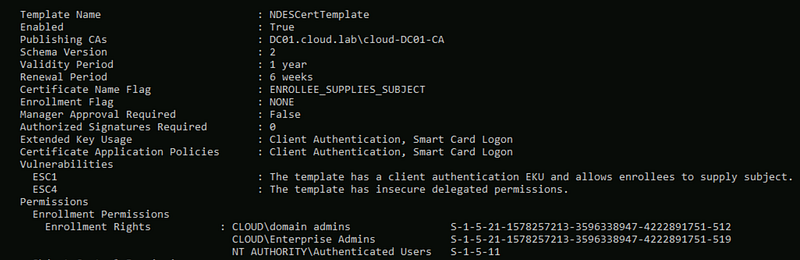
This configuration exposes the template to ESC1 and ESC4, giving Authenticated Users a near-direct path to Domain Admin.
4. Kandji
Kandji’s guide has you create a Computer-based AD CS certificate template so Kandji can request device identity certificates from your Microsoft CA via its AD CS Connector. This is documented here: AD CS Integration: Create a Computer Certificate Template
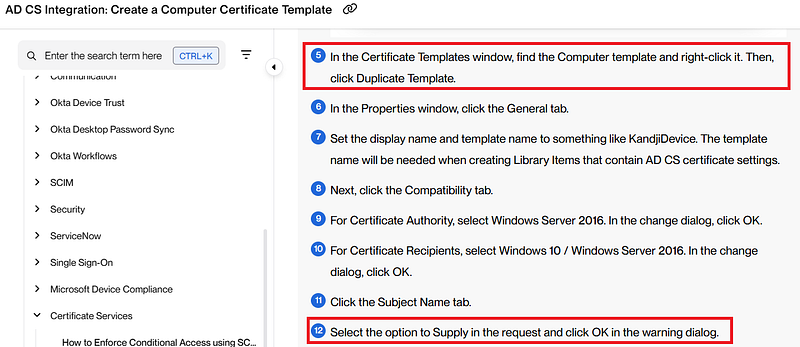
The instructions say to duplicate the Computer template, then enable Supply in the request.
The next step is to give the AD CS Connector’s computer account Read and Enroll permissions. Based on the screenshot, it looks like we can keep the current security settings and simply add that computer account with enroll rights.
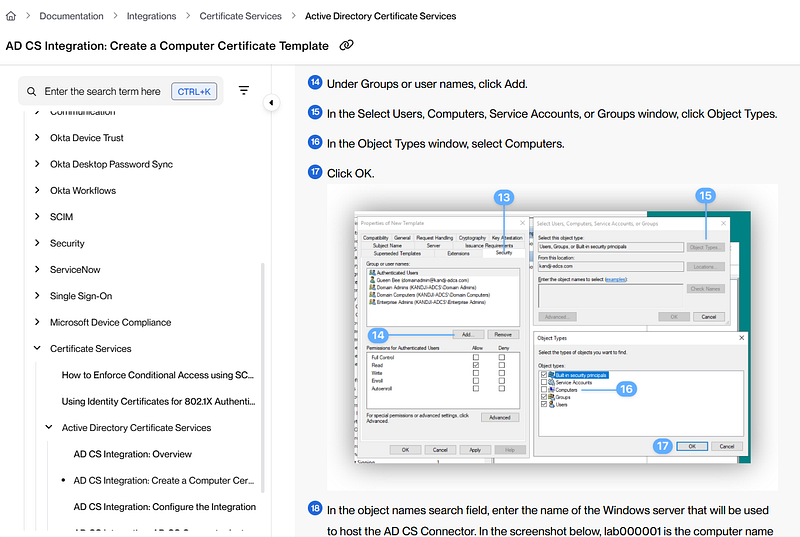
The Windows Server hosting the AD CS Connector now needs Tier-0 treatment. If the default security descriptor wasn’t tightened, Domain Computers can use ESC1 to reach Domain Admin.
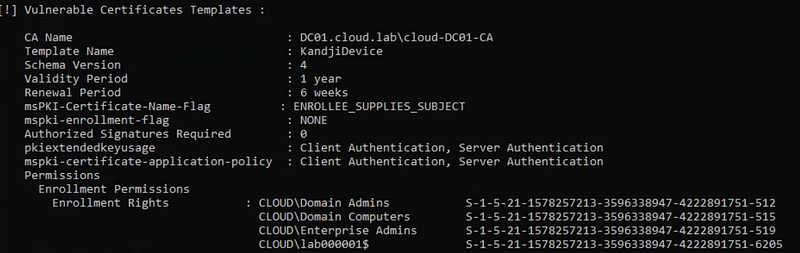
Update: After reaching out to Kandji via email about this issue, they’ve since updated their official documentation. It now clearly instructs users to remove all existing security principals and grant enrollment permission solely to the specific computer account.
5. Anyware SSO
Anyware SSO needs an AD CS certificate template so its broker/connector can enroll user certificates that the platform uses for sign-in (smartcard-style) during federated SSO. This has been documented here: Preparing for Single Sign-On — Anyware Manager as a Service
It starts by telling us to duplicate the Smartcard User template.
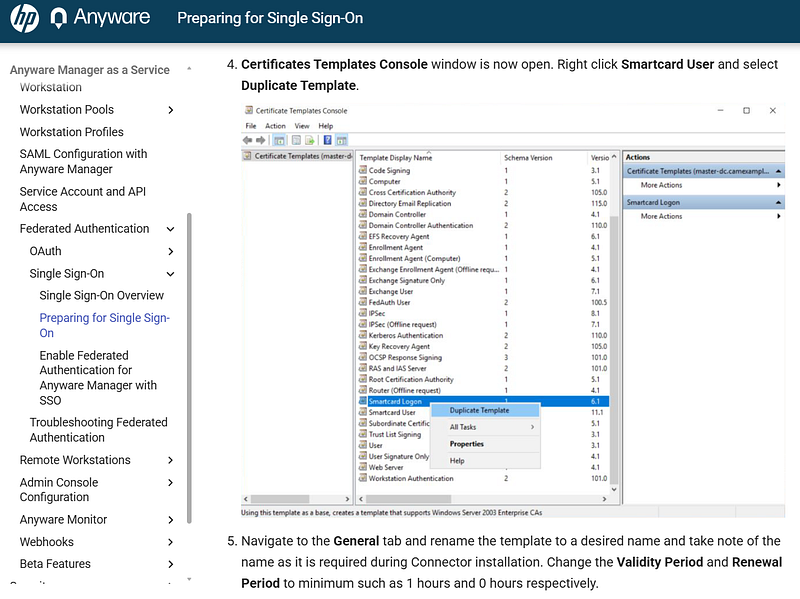
Next, it instructs granting Authenticated Users Read and Enroll permissions on the template.
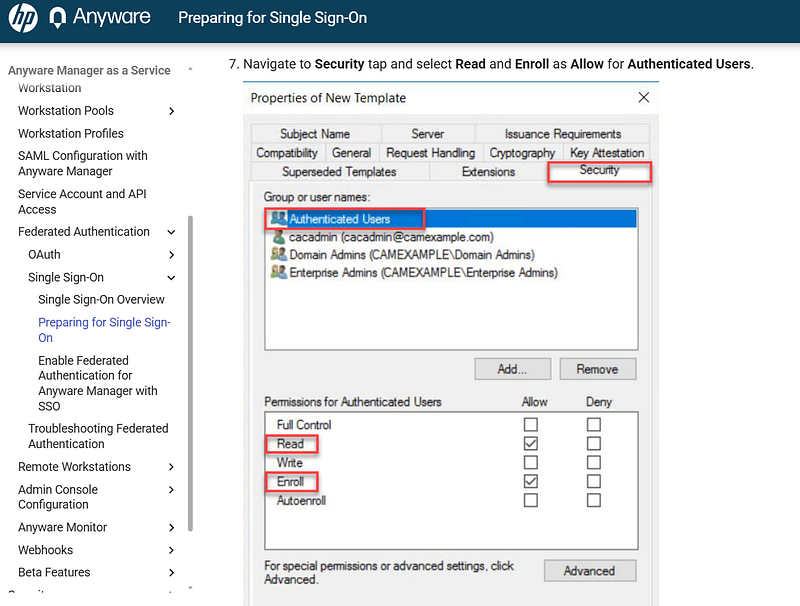
Finally, it tells you to enable Supply in the request and issue the template in Active Directory.
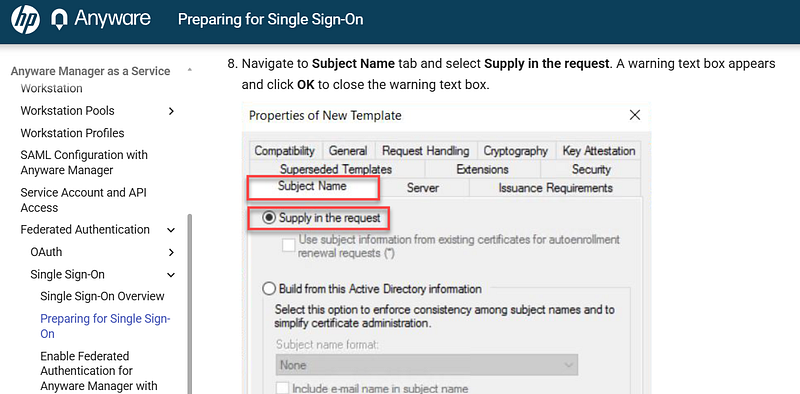
This setup lets Authenticated Users exploit ESC1 and escalate to Domain Admin.
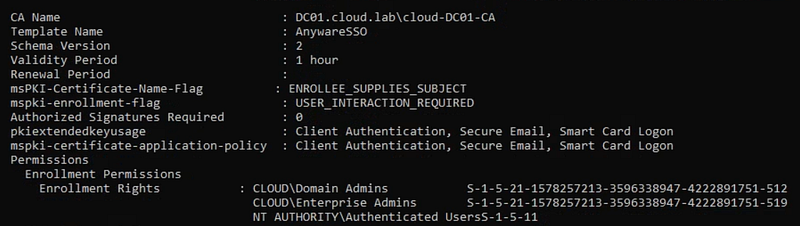
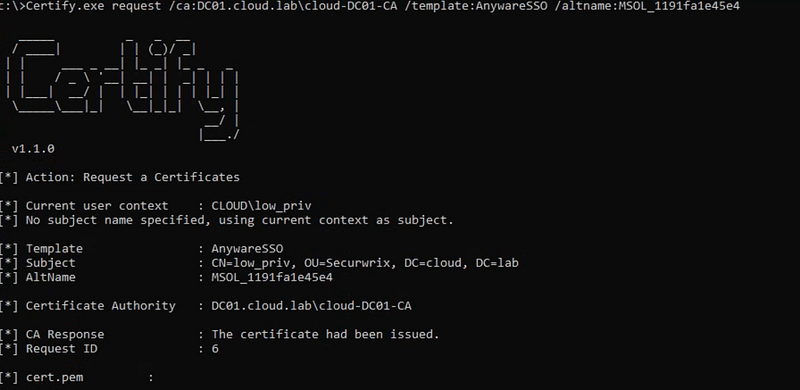
With Certify, I requested the AnywareSSO certificate to impersonate the MSOL account from a low-privileged account.
6. Cisco 9800 Wireless LAN Controller (WLC)
Cisco’s guide uses an AD CS certificate template (via NDES/SCEP) to issue Locally Significant Certificates (LSCs) to Cisco access points and the 9800 WLC. The LSCs are device identity certs the APs use to join the WLC securely and can also be used for things like 802.1X/EAP-TLS on switch ports. This has been documented here: Configure SCEP for Locally Significant Certificate Provisioning on 9800 WLC — Cisco
The initial step is to clone the User template, call it 9800-LSC, and set its validity to 2 years.
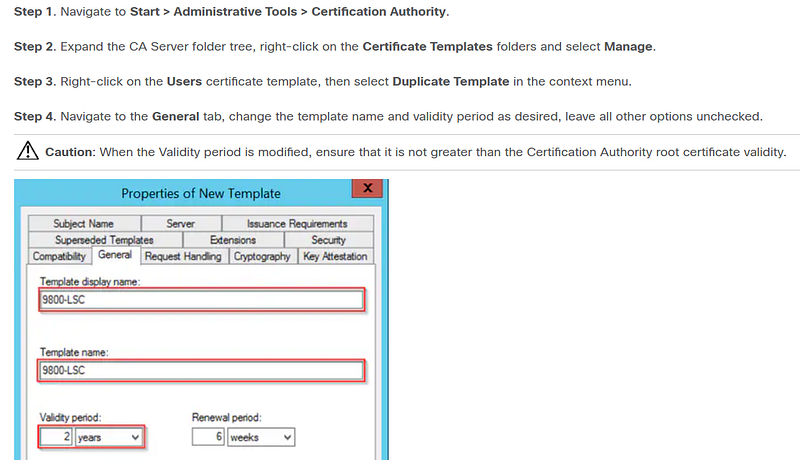
The next step is to turn on Supply in the request.
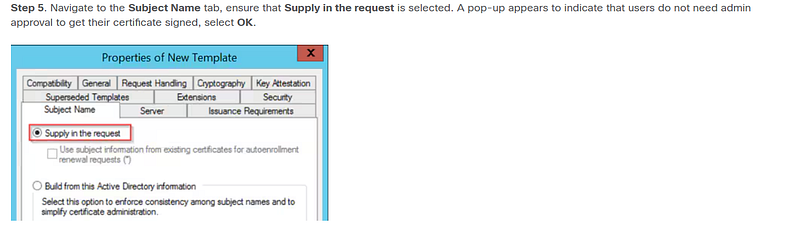
The instructions explicitly tell us to verify that Client Authentication is selected.
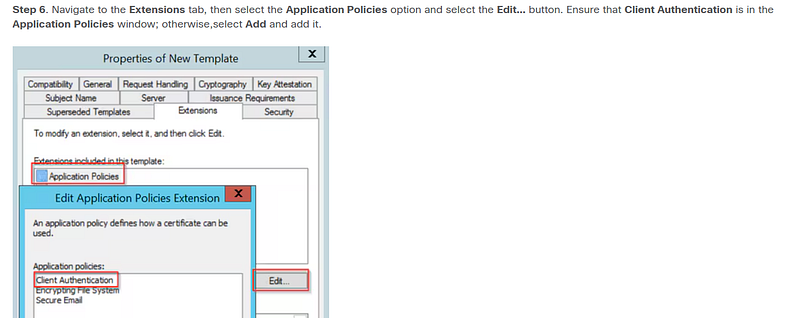
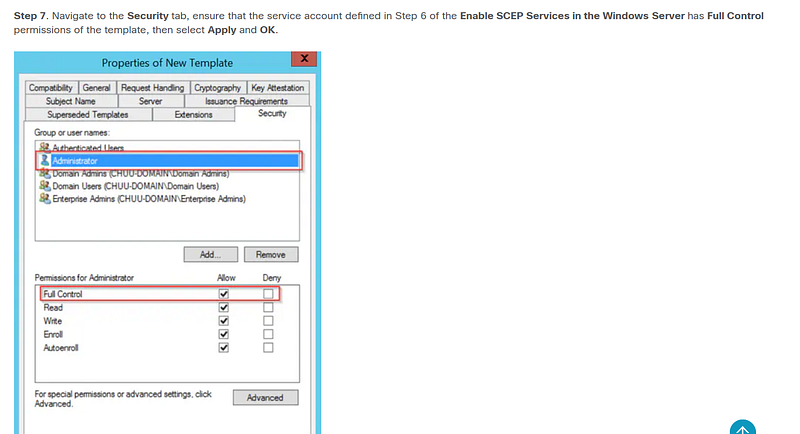
The next step oddly grants the service account Full Control on the template, which isn’t necessary in most cases. Also, duplicating the User template leaves Domain Users with Enroll by default.
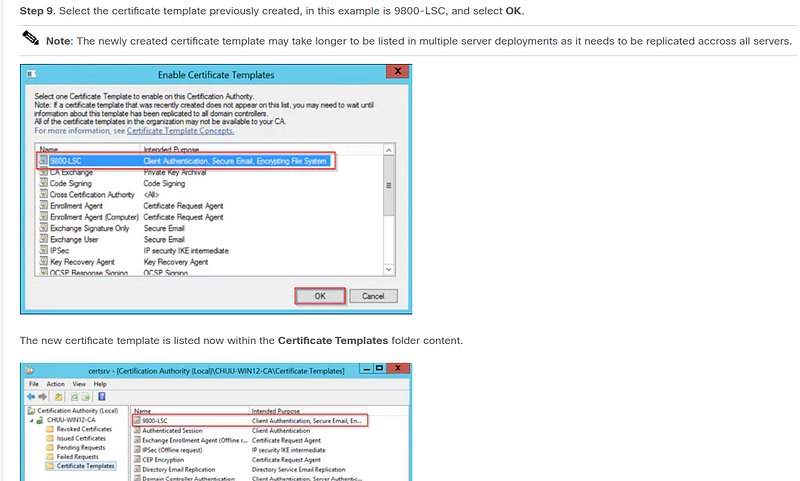
The final step is to issue the certificate template.
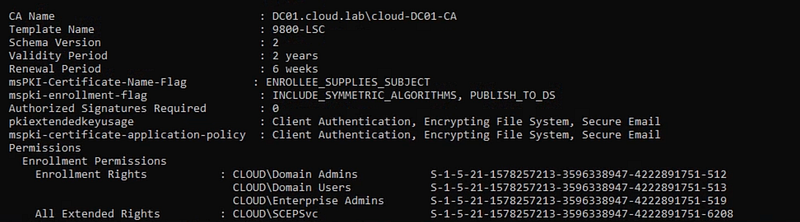
With this setup, the service account can escalate to Domain Admin via ESC1 and if you leave the defaults, Domain Users can do the same.
7. Delinea Connector
The Delinea connector is a multipurpose service that provides support for key features and enables secure communication between other services on your internal network or a cloud instance. Not all services require a connector, however. For example, if all users are Privileged Access Service user accounts, the connector isn’t required. The connector requires a signed certificate and root of trust in order to communicate with the Delinea PAS. This is documented here: Creating a Connector Machine Certificate from an Internal Microsoft CA
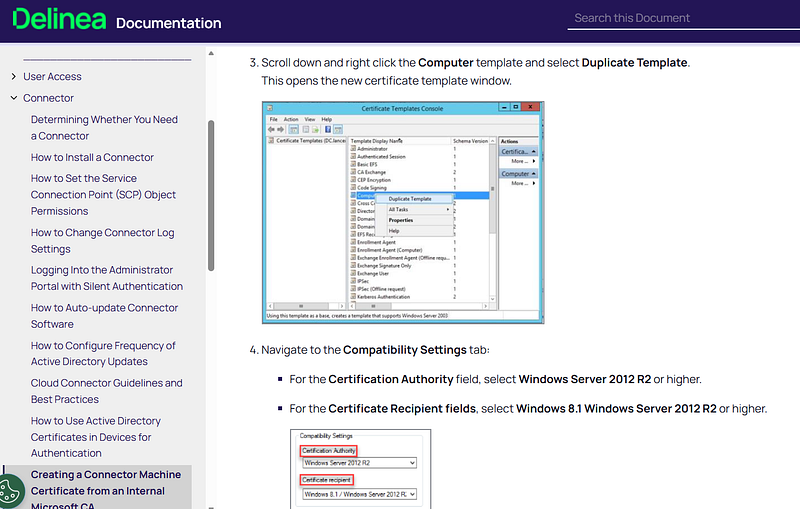
First, the guide has you duplicate the Computer template and adjust the compatibility settings.
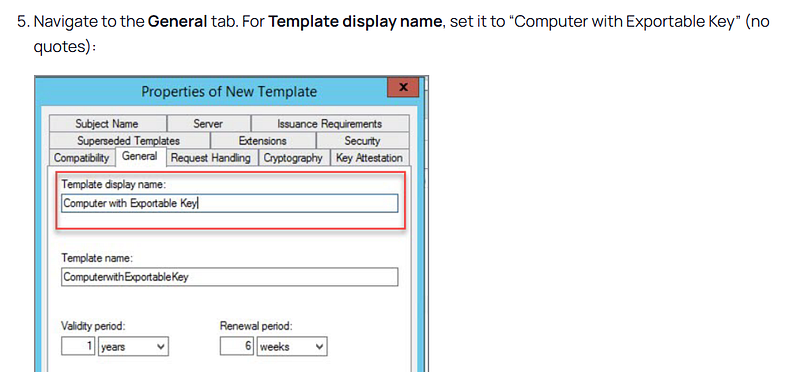
The second step specifies the exact template name to use.
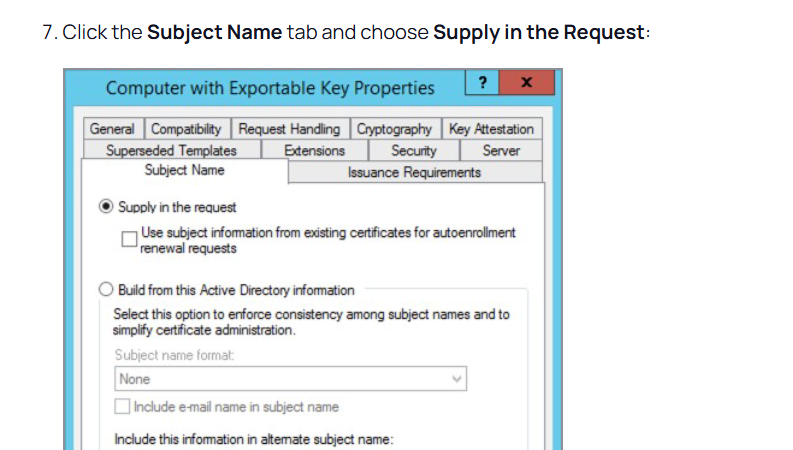
Next, it tells you to check Supply in the request.
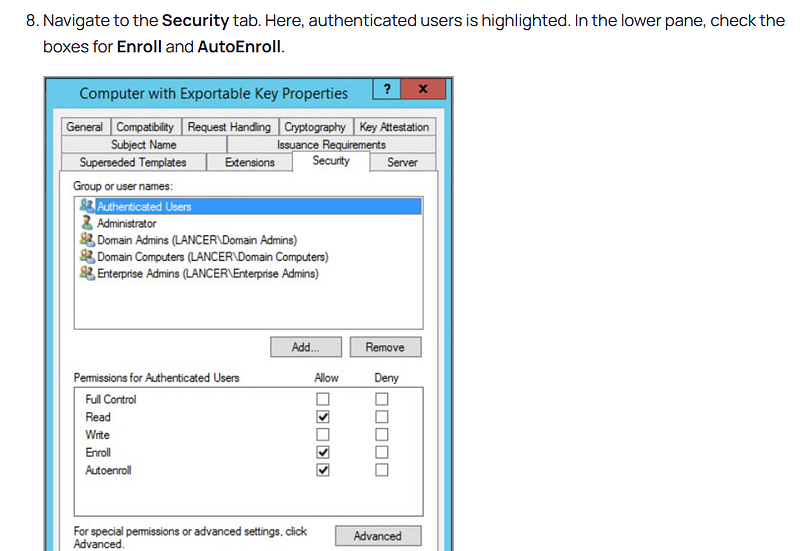
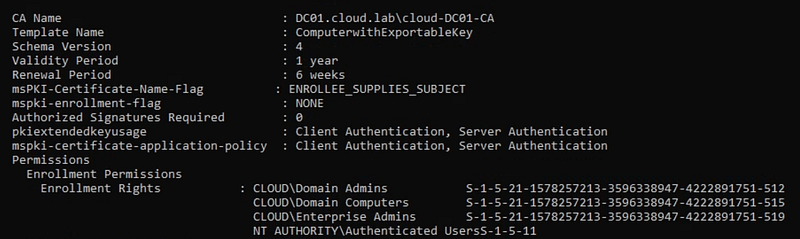
The final step is to assign Authenticated Users Read, Enroll, and Autoenroll rights to the template.
To finish, issue the template on the CA in Active Directory.
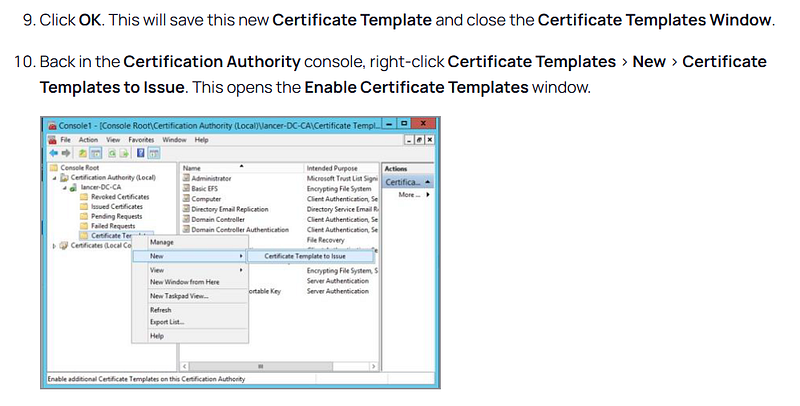
With this setup, Authenticated Users and the default Domain Computers can enroll for the template, creating an ESC1 path that can be abused to reach Domain Admin.
8. Netskope Private Access
Netskope Private Access needs an AD CS device-certificate template so the Netskope client on an Autopilot machine can enroll a machine certificate and use it to bring up a pre-logon tunnel to internal resources before any user signs in. This is documented here: Windows Autopilot with Private Access Prelogon — Netskope Knowledge Portal
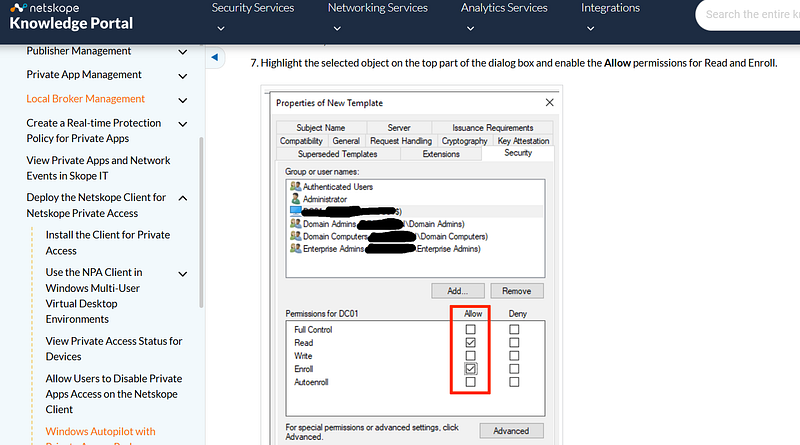
The guide starts by duplicating the Workstation Authentication template, then going to Request Handling to enable Allow private key to be exported.
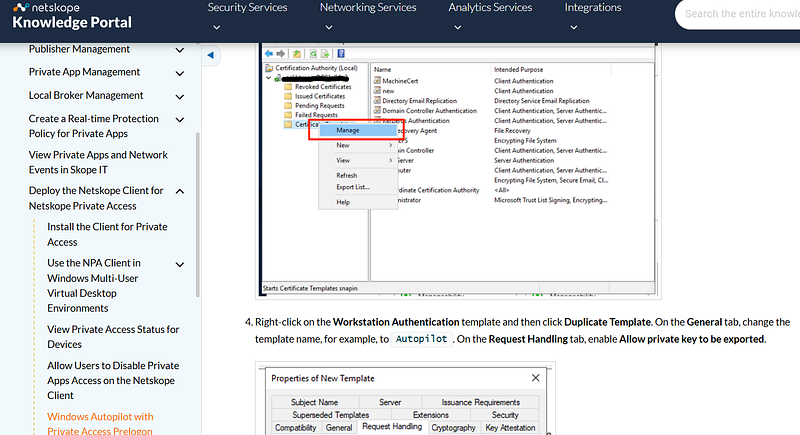
Next, grant the Intune Certificate Connector’s computer account Read and Enroll on the template.
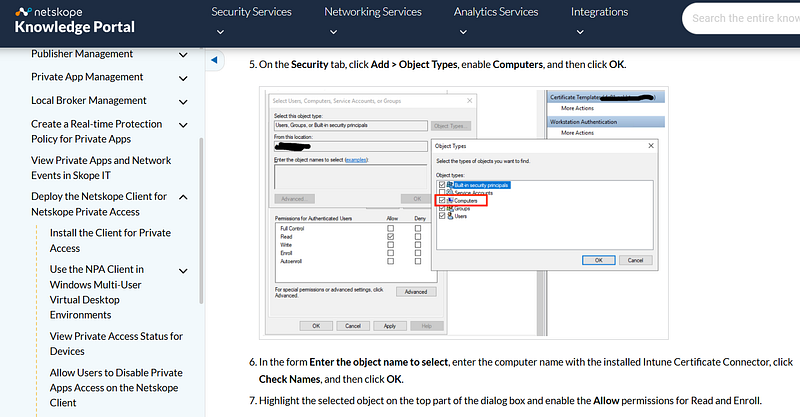
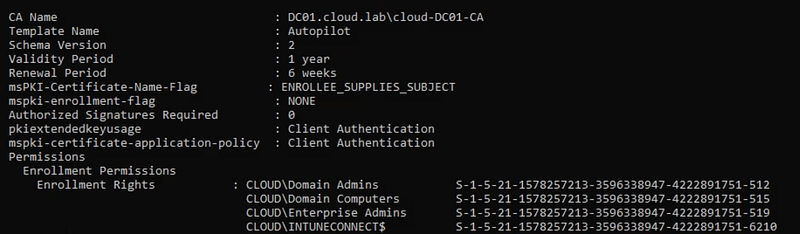
The permissions should match this. By default, Domain Computers have Enroll on the template.
The final step is to switch on Supply in the request for this template.
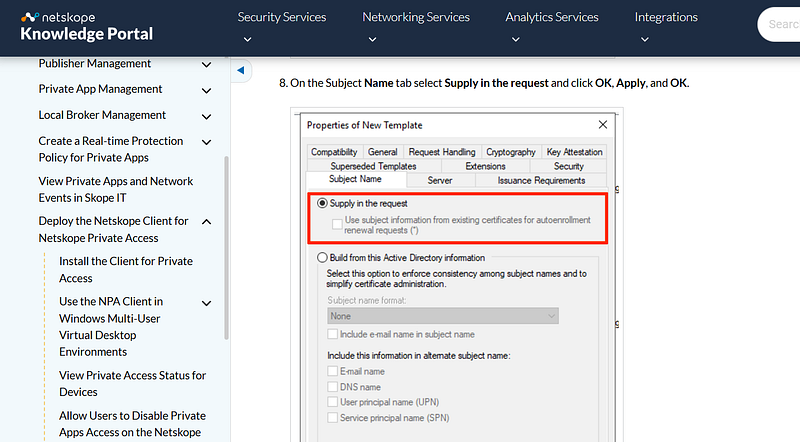
This setup is risky because Domain Computers can use ESC1 to reach Domain Admin, and the Intune Certificate Connector host is effectively Tier 0.
Update: It looks like Netskope has updated their documentation and removed the entire section about creating an AD CS template.
9. Cisco pxGrid
Cisco pxGrid (Platform Exchange Grid) is a way for Cisco ISE and third-party tools to securely share live network and identity context. The pxGrid client connects to an ISE pxGrid node and exchanges data over a TLS/SASL session. The documentation shows how to use a Microsoft Enterprise CA to create a custom certificate template for pxGrid so both the ISE pxGrid node and pxGrid clients can get CA-signed certs for mutual TLS. PXGrid Integration with Cisco StealthWatch — Cisco Community
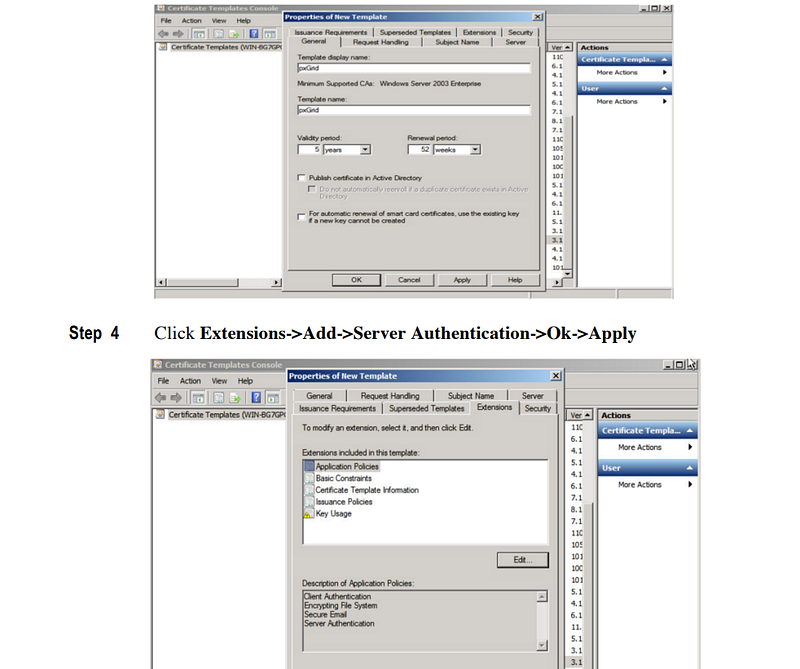
The guide begins by duplicating the User template.
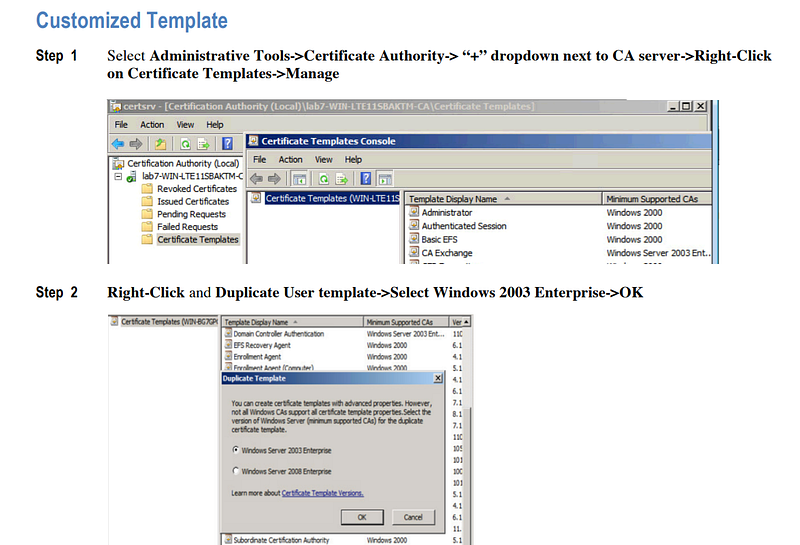
The next step is to include Server Authentication in EKUs; Client Authentication stays unchanged by default.
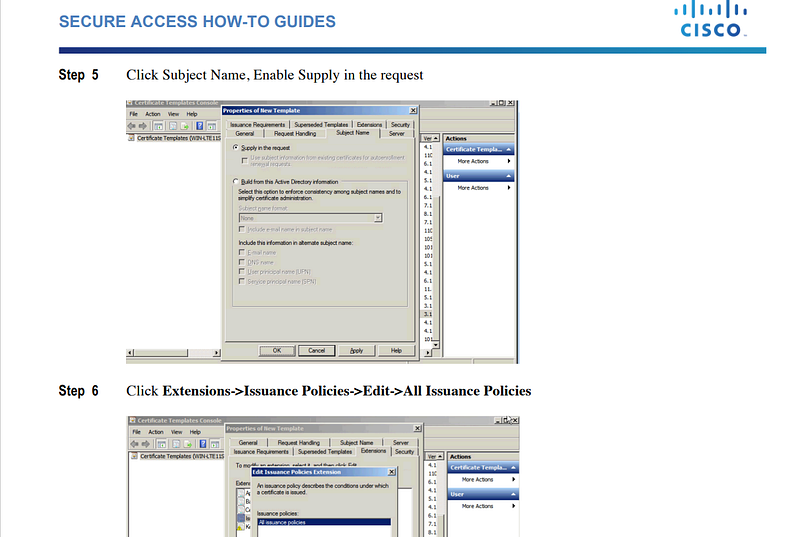
Next, enable Supply in the request and select all issuance policies.
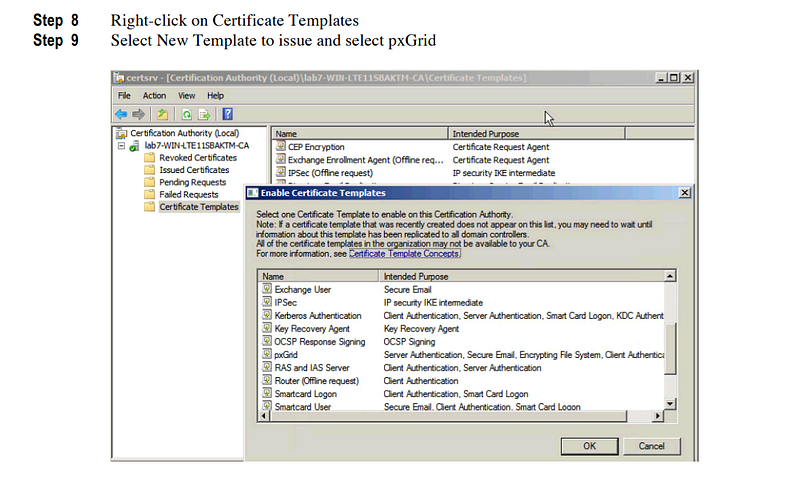
The final step is to publish the template in AD.
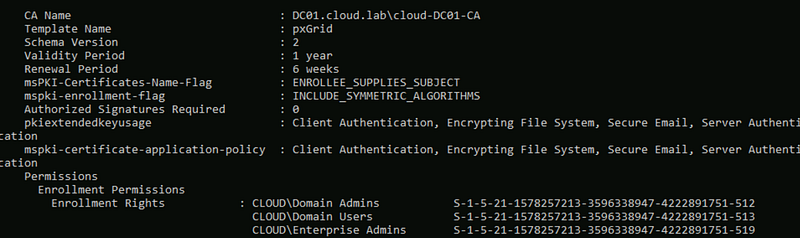
Duplicating the User template gives Domain Users enroll by default. Since the guide doesn’t tighten permissions, Domain Users can use this pxGrid template for ESC1 to Domain Admin.
10. OpenScape Deployment Service (DLS)
OpenScape Deployment Service (DLS) — a Mitel/Unify service that deploys and manages phones and related components, with a built-in PKI Connector/Plug-ins to integrate with Microsoft Enterprise CAs for certificate issuance and trust. The templates let OpenScape DLS request certificates from AD CS: a User-based template issues client certificates to phones for mutual TLS with DLS, and a Web Server template secures the DLS web interface with HTTPS. Both use “Supply in the request,” with the DLS service account allowed to enroll. OpenScape Deployment Service V10, PKI Basic Configuration Guide, Service Documentation
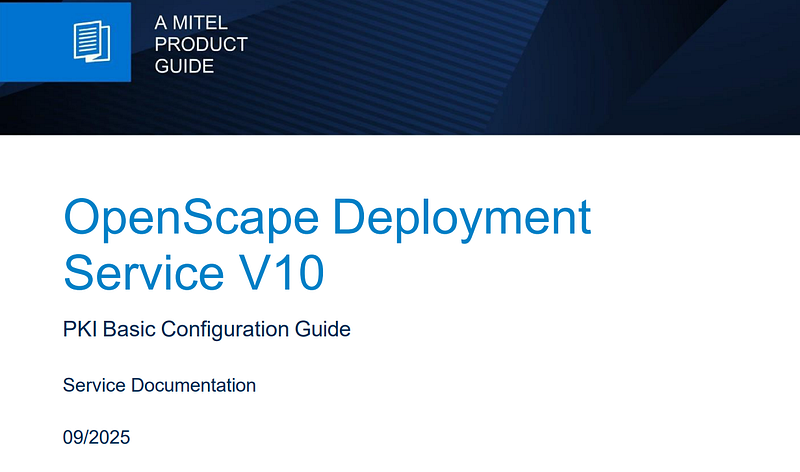
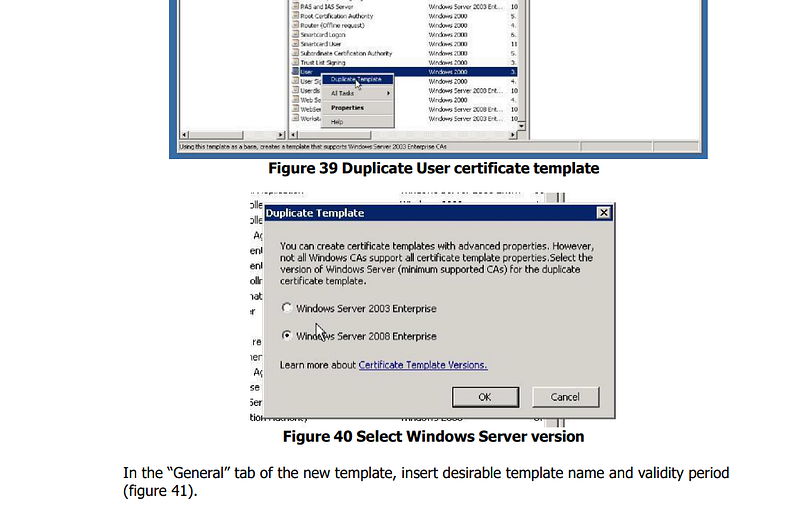
First, it tells you to duplicate the User template.
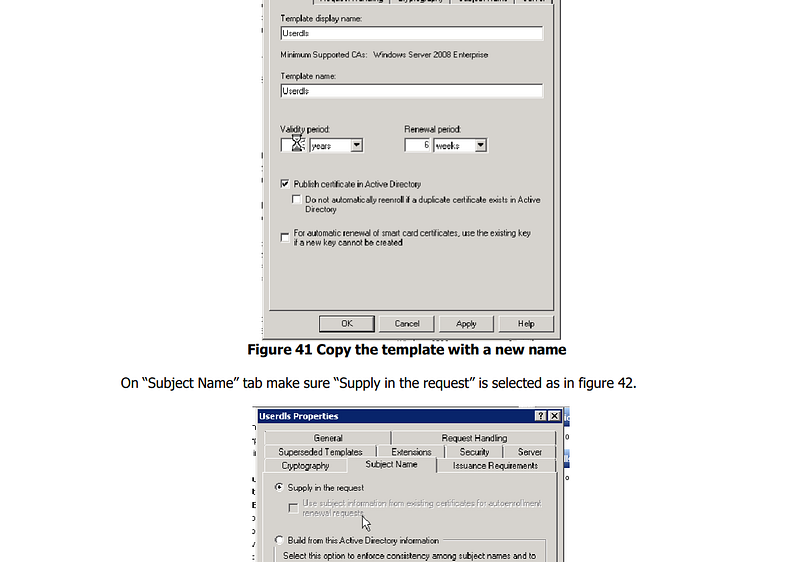
The second step is to enable the Supply in the request checkbox.
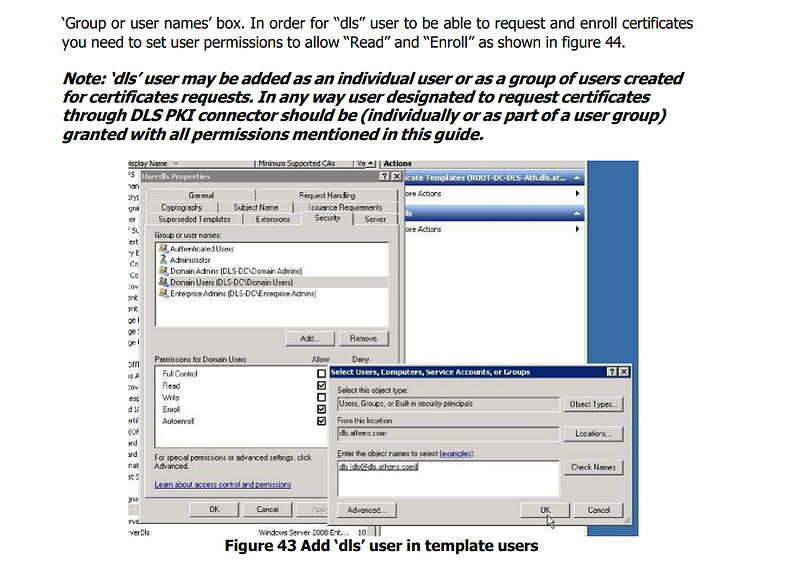
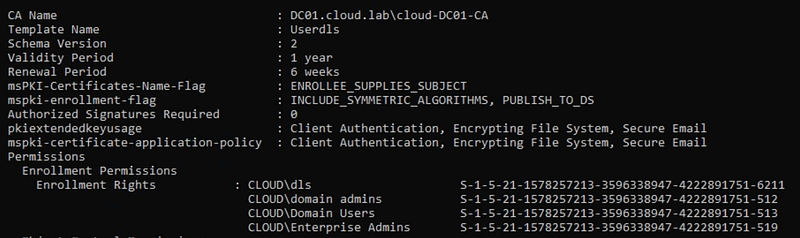
Next, grant the DLS service account Read and Enroll. Note that Domain Users already have Enroll by default, and the instructions leave that as-is.
The guide also has you duplicate the Web Server template, but I’m skipping that for now. Here we can see that we’re issueing both templates now.
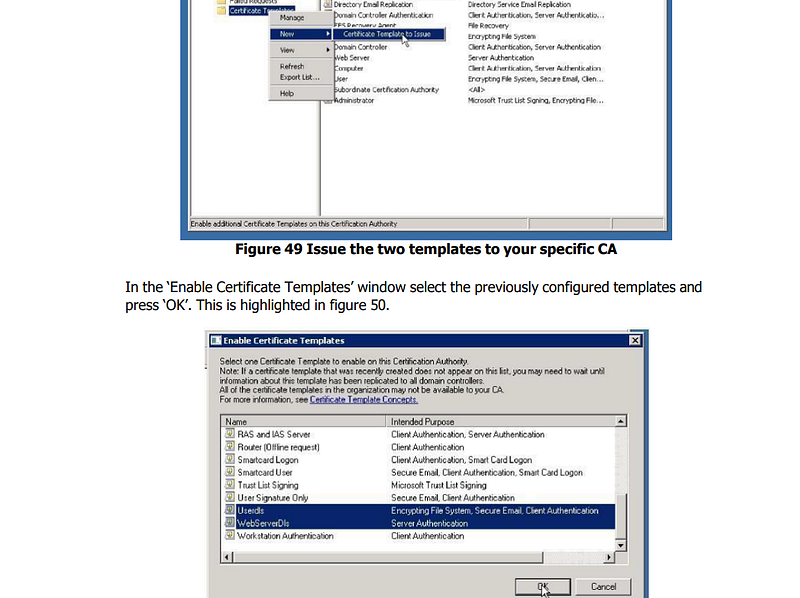
This setup is risky: the DLS service account must be treated as Tier 0, and Domain Users remain at their default permission, leaving an ESC1 path to Domain Admin.
Conclusion
Many vendors require certificate templates that can expose your whole environment. Regularly audit Active Directory Certificate Services to check for risky templates. I plan to update this post as I come across vendors with guides that create ESC1-style templates.
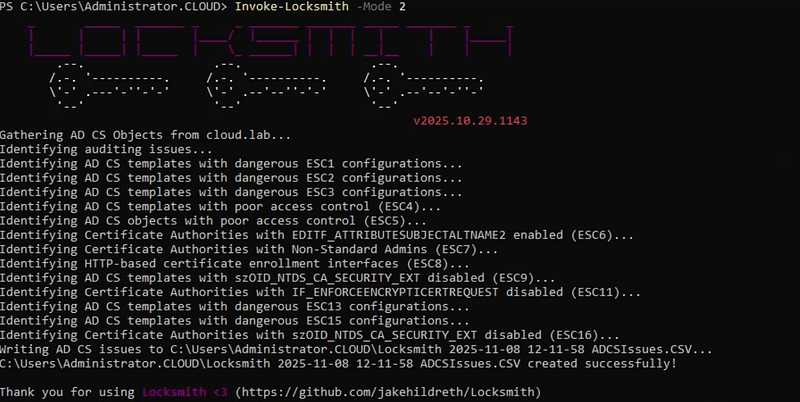
Now that you know this is a serious security risk, run the PowerShell script Invoke-LockSmith to automatically find insecure templates and start fixing them.