The official Kubernetes documentation describes Kubernetes as “an open-source system for automating deployment, scaling, and management of containerized applications.”
What Kubernetes exactly is?
It is an open-source containerization orchestration platform, developed as a project by Google and currently maintained by the Cloud Native Computing Foundation. It is easily portable across clouds and on-premises. With its growing ecosystem of projects and products by both member and non-member partners, Kubernetes has been recognized as the “go to” container orchestration solution.
So what Kubernetes is not?
- It is not a traditional, all-inclusive platform as a service.
- It is not rigid or opinionated but, more of a flexible model that supports an extremely diverse variety of workloads, and containerized applications.
- It does not provide continuous integration/ continuous delivery pipelines to build applications or deploy source code.
- It does not prescribe logging, monitoring, and alerting solutions.
- It does not provide built-in middleware, databases, or other services.
Concepts of Kubernetes
- Pods represent the smallest deployable compute object and the higher-level abstractions to run workloads.
- Services expose applications running on sets of Pods. Each Pod is assigned a unique IP address. Sets of Pods have a single DNS name.
- Kubernetes supports both persistent and temporary storage for Pods.
- Configuration, which refers to the provisioning of resources for configuring Pods.
- Security measures for cloud-native workloads, which enforce security for Pod and API access.
- Cluster administration provides the details necessary to create or administer a cluster.
What’s Kubernetes capable of?
- Automated rollouts and rollbacks — Progressively rolls out changes to application or configuration, monitors application health and rolls back changes.
- Storage orchestration —Automatically mounts a chosen storage system whether from local storage, network storage, or public cloud.
- Horizontal scaling — Scales loads automatically based on metrics, or via commands.
- Secret and configuration management — Stores and manages sensitive information including passwords, OAuth tokens, and SSH keys, and handles deployments and updates to secrets and configuration without rebuilding images.
- Self-Healing —Restarts, replaces, reschedules, and kills failing or unresponsive containers, exposes containers to clients only if they are healthy and up and running.
Ecosystem of Kubernetes
Kubernetes ecosystem is a large, rapidly growing ecosystem where its services, support, and tools are widely available. It provides additional Kubernetes services like; Building container images, Storing images in a container registry, Application logging and monitoring, and CI/CD capabilities.
 Ecosystem of Kubernetes
As you can see in the diagram, The Kubernetes ecosystem is a huge collection of products, services and providers. It consists of public cloud providers, Open source framework providers, Management providers, Tool providers, Monitoring & logging providers, Security providers and load balancing providers.
Kubernetes Architecture
 Source — https://cloudwithease.com/what-is-kubernetes/
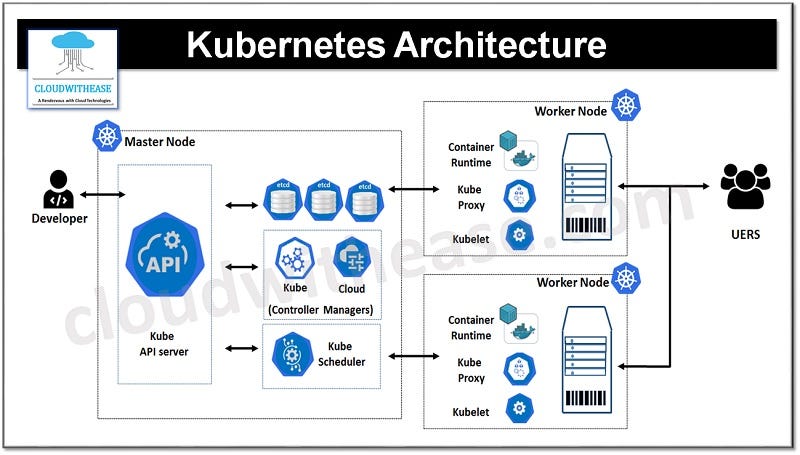
A deployment of Kubernetes is called a Kubernetes cluster. It consists of nodes that run containerized applications. Each cluster has one master node which is the Kubernetes Control Plane and one or more worker nodes.
- Control plane maintains the intended cluster state by making decisions about the cluster and detecting and responding to events in the cluster.
- Worker nodes are the worker machines in a Kubernetes cluster. In other words, user applications run on nodes. Nodes are not created by Kubernetes itself, but rather by the cloud provider. This allows Kubernetes to run on a variety of infrastructures. The nodes are then managed by the control plane.
Components of Control Plane
- In the Kubernetes control plane, the Kubernetes API server exposes the Kubernetes API. The API server serves as the front-end for the control plane. All communication in the cluster utilizes this API. For example, the Kubernetes API server accepts commands to view or change the state of the cluster. The main implementation of a Kubernetes API server is kube-apiserver which is designed to scale horizontally — by deploying more instances. You can run several instances of kube-apiserver and balance traffic between those instances.
- Etcd is a highly available, distributed key value store that contains all the cluster data. When you tell Kubernetes to deploy your application, that deployment configuration is stored in etcd. It defines the state in a Kubernetes cluster, and the system works to bring the actual state to match the desired state.
- The Kubernetes scheduler assigns newly created Pods to nodes. This basically means that the kube-scheduler determines where your workloads should run within the cluster. The scheduler selects the most optimal node according to Kubernetes scheduling principles, configuration options, and available resources.
- The Kube controller manager runs all the controller processes that monitor the cluster state, and ensure the actual state of a cluster matches the desired state.
- Finally, the Cloud controller manager runs controllers that interact with the underlying cloud providers. These controllers effectively link clusters into a cloud provider’s API. Since Kubernetes is open source and would ideally be adopted by a variety of cloud providers and organizations, Kubernetes strives to be as cloud agnostic as possible.
Components of Worker Node
- The Kubelet is the most important component of a worker node. This controller communicates with the kube-apiserver to receive new and modified pod specifications and ensure that the pods and their associated containers are running as desired. The kubelet also reports to the control plane on the pods’ health and status.
- The Container runtime is responsible for downloading images and running containers. Rather than providing a single container runtime, Kubernetes implements a Container Runtime Interface that permits pluggability of the container runtime. While Docker is likely the best-known runtime, Podman and Cri-o are two other commonly used container runtimes
- Lastly, the Kubernetes proxy is a network proxy that runs on each node in a cluster. This proxy maintains network rules that allow communication to Pods running on nodes — in other words, communication to workloads running on your cluster. This communication can come from within or outside of the cluster.
Objects of Kubernetes
Kubernetes objects are persistent entities.
- Persistent — It will last even if there is a server failure or network attack
- Entity — It has an identity and associated data
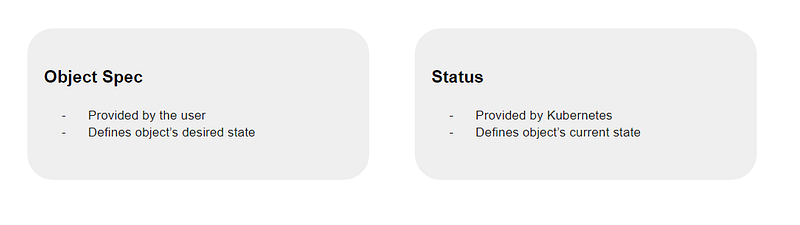
Kubernetes objects consist of two main fields — Object spec and Status. The Object spec is provided by the user which dictates an object’s desired state. Status is provided by Kubernetes. This describes the current state of the object.
Kubernetes works towards matching the current state to the desired state. To work with these objects, use the Kubernetes API directly with the client libraries, and the kubectl command-line interface, or both.
Kubernetes objects are as follows:
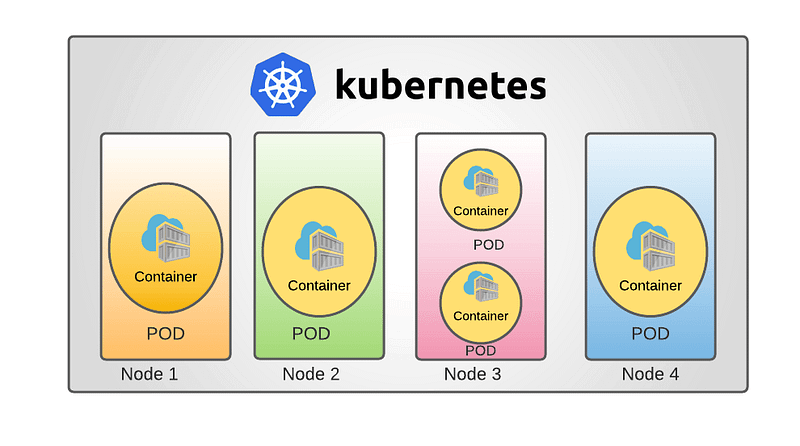
- A Pod is the simplest unit in Kubernetes. A Pod represents a process or a single instance of an application running in the cluster. A Pod usually wraps one or more containers. Creating replicas of a Pod serves to scale an application horizontally.
 Source — https://ostechnix.com/wp-content/uploads/2022/02/Kubernetes-Cluster.png
- Namespaces provide a mechanism for isolating groups of resources within a single cluster. This is useful when teams share a cluster for cost-saving purposes or for maintaining multiple projects in isolation. Namespaces are ideal when the number of cluster users is large.
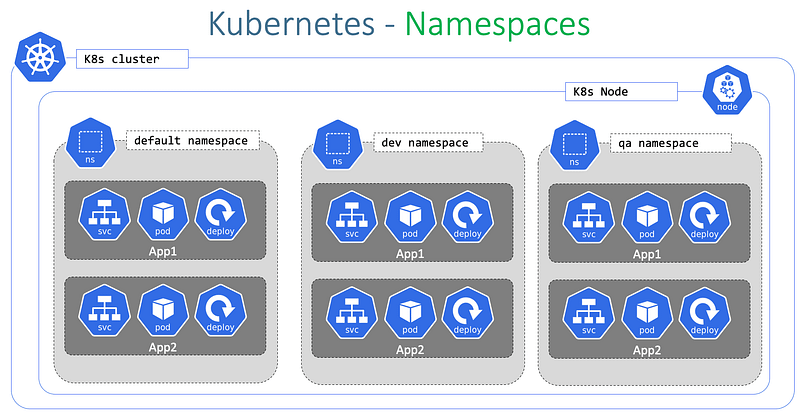 Source — https://stacksimplify.com/course-images/azure-kubernetes-service-namespaces-2.png
- A ReplicaSet is a set of identical running replicas of a Pod that are horizontally scaled. The replicas field specifies the number of replicas that should be running at any given time. Whenever this field is updated, the ReplicaSet creates or deletes Pods to meet the desired number of replicas.
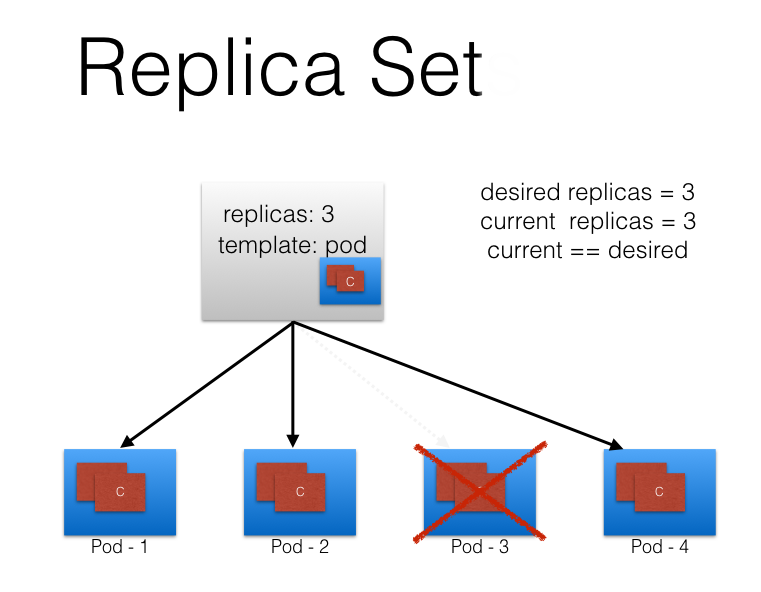 Source — https://miro.medium.com/v2/resize:fit:1100/format:webp/1*J7vyXmySTT25wuflaKkLvw.png
- A Deployment is a higher-level object that provides updates for both Pods and ReplicaSets. Deployments run multiple replicas of an application using ReplicaSets and offer additional management capabilities on top of these ReplicaSets.
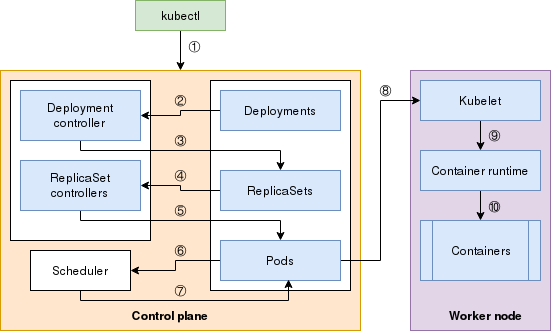 Source — https://opensource.com/sites/default/files/uploads/pod-chain_0.png
Benefits of Kubernetes
- Kubernetes provides self-healing abilities and has excellent application support. Kubernetes has self-healing abilities by default, although only for pods in containers. It provides self-healing layers to ensure that applications remain effective and reliable. Furthermore, the service can manage backups and fail-overs and offers can operate any operation that a container can operate.
- Kubernetes lets developers utilize the entire cluster. The cloud containerization platform lets developers direct the deployment application patterns. Developers can customize it to process workloads on the whole cluster rather than a specific server. It also lets them create containers upon containers for each application using the abstraction layer over node clusters for hardware.
- It delivers load balancing and monitoring. Kubernetes lets people in charge, administrators or authorized individuals, monitor, manage and operate several containers concurrently. It also lets administrators manage workload by assigning a minimum and maximum available CPU and memory for each container and adjusting container size. Plus, it can manage swift load-balancing and supports assigning individual IP addresses for each pod.
- Another desired feature of Kubernetes is its portability and cost-efficiency in terms of computing resources. Therefore, it can be moved and applied inside organizations or transferred to other systems.
Drawbacks of Kubernetes
- It has a steep learning curve. Developing and operating Kubernetes containers requires training and a lot of practice. Therefore, it’s not ideal for beginners or developers making simple applications or developing locally.
- Debugging, integration, and troubleshooting require expertise. Similarly developing, problem-solving, bug removal, and integration with new applications are troublesome. Thus, it’s required knowledgeable individuals to help train others or fix issues.
- Transition can be confusing and time-consuming. With the two downsides of Kubernetes above, you know that transitioning a company or an enterprise to Kubernetes may require a lot of work, time, and resources. Even with experts’ help, team members would need time to adjust to the new workflow.
- A threat to DevOps teams. Kubernetes automates containerized environments thanks to the so-called GitOps system it introduced. In short, all applications are deployed based on a git repository. That makes it easy to automate functions. It is great for the company’s efficiency and money, but some people will have to rethink their careers.
Kubernetes itself is a very vast topic and here I explained only the basics of Kubernetes. There are many tutorials all over the internet to learn and use Kubernetes and below are some of them.
Tutorials This section of the Kubernetes documentation contains tutorials. A tutorial shows how to accomplish a goal that is…kubernetes.io
Kubernetes Tutorial Kubernetes Tutorial - Kubernetes is a container management technology developed in Google lab to manage containerized…www.tutorialspoint.com
Kubernetes Tutorials For Beginners [43 Comprehensive Guides] In this blog, I have covered a list of kubernetes tutorials that can help beginners to learn Kubernetes with practical…devopscube.com
Get Started with Kubernetes Ultimate Hands-on Labs and Tutorials Get Started with Kubernetescollabnix.github.io
Thank you for reading my article. Feel free to comment your ideas, suggestions and don’t forget to follow!