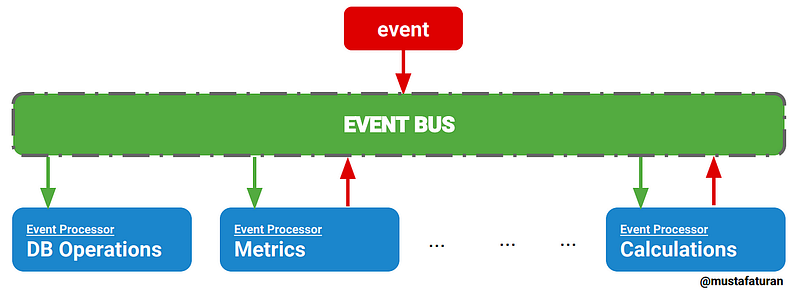
What is EventBus? EventBus is a publish/subscribe event bus for Android and Java. but how it works?
In this article we found out how it works and create simple EventBus library, but at first you must know this topics: Observer, Annotation, Refelction.
At first we need single class to store all registered objects and send event to them, for this reason we create singleton class to achive this goal, why singleton? because we only need single instance of our eventbus.
here is a sample class of our EventBus:
import java.util.ArrayList;
import java.util.List;

public class EventBus {

    private static EventBus instance;

    public static EventBus getInstance(){
        if(instance == null)
            instance = new EventBus();
        return instance;
    }

    private List<Object> listeners = new ArrayList<>();


    private EventBus(){}


    public void register(Object registerClass){

    }

    public void unregister(Object registeredClass){

    }

    public void post(Object message){

    }

}
Ok, in this step we need fill out methods.
register and unregister are easy they don’t do any thing special:
public void register(Object registerClass) {
    if (!listeners.contains(registerClass))
        listeners.add(registerClass);
}

public void unregister(Object registeredClass) {
    listeners.remove(registeredClass);
}
All of our magic do in post method. post method must post our message to all of class that listen to this type of message, but how to found out a class listen to our message?
There is two option for reaching our goal:
- Using annotation to mark receiver methods
- Using constant method name for our receiver method
Annotation
For this option we must create runtime annotation for mark our receiver method, we named this annotation Subscribe:
@Retention(RetentionPolicy.RUNTIME)
@Target({ElementType.METHOD})
public @interface Subscribe {

}
Now when you create your receiver method mark your method with this annotation, like below:
public void post(Object message) {
    for (Object item : listeners) {
        for (Method method : item.getClass().getDeclaredMethods()) {
            Annotation methodAnnotation = method.getAnnotation(Subscribe.class);
            if (methodAnnotation != null && method.getParameterCount() == 1 && method.getParameterTypes()[0].getName().equals(message.getClass().getName())) {
                try {
                    method.invoke(item, message);
                } catch (Exception ignored) {
                }
                break;
            }
        }
    }
}
As you see, in this method we get all declared methods in our objects and find annotated method and invoke that. we have some limitation whit this solution such as, run time method list navigation, multi subscribe with same argument and ect.
Constant method name
Another solution is using constant method name for our subscriber method, some thing like “messageReceiver” for this approach we change our post method to some thing like bellow:
public void post(Object message) {
    for (Object item : listeners) {
        try {
            Method messageReceiver = item.getClass().getMethod("messageReceiver", message.getClass());
            messageReceiver.invoke(item , message);
        } catch (Exception ignored) {
        }
    }
}
As you see, in this method we have some limitation for naming our methods but it’s so much faster than previous solution.
don’t forget to unregister your objects when exposing your object.
Conclusion
In this article you create sample EventBus class to create observer pattern in all of your app and for all of message types and find out how EventBus work internally, for more detail you can see EventBus source code in this link. Libraries use simple definition to make big difference in our life.