From good code to reliable software: A practical guide to production-ready Python packages
Most of us have written Python that worked beautifully — right up until someone else tried to install it, run it on a different machine or contribute without breaking things. The gap between “good code” and “reliable software” is rarely about algorithms. It is about everything around the code: packaging, testing, automation and the boring-but-critical guardrails that make a package safe to use and change.
This post is for developers who already know how to code and use Git, but want their Python package to survive its first real users and outlive its original author. It’s not about prototypes or one-off notebooks. It is about software that runs in production, gets deployed and keeps delivering value after the first release.
Why AI-assisted coding makes this more important, not less
AI-assisted coding makes this even more urgent. Generating code is now easy, fast and inexpensive; maintaining a production-grade package is not. The more code, no matter whether it is written by humans or AI, flows into a repo, the more you need guardrails: repeatable installs, predictable checks and automated verification of quality and security. Without them, AI doesn’t help you move faster; it helps you accumulate technical debt (and potentially chaos) faster.
There’s an interesting tension here. On one hand, you might argue that some of these practices become less important if AI writes code for AI to read: why bother with perfect formatting if no human reads it? On the other hand, the opposite is true in practice:
- Linting becomes even more valuable when AI generates code. LLMs can produce subtly incorrect code: unused imports, unreachable branches, type mismatches. Automated linting catches these issues instantly, creating a feedback loop where the AI can correct its own mistakes before they reach production.
- Type checking acts as a specification language. When you provide type hints, you are giving AI (and future contributors) a contract to work against. Type checkers will immediately flag when generated code violates that contract.
- Tests become the ground truth. AI can generate plausible-looking code that’s subtly wrong. A comprehensive test suite is your objective measure of correctness; it doesn’t matter how the code was written if it passes the tests.
- Reproducible environments are non-negotiable. AI-generated code often includes dependencies. Without proper lock files and environment management, you might end up with “it worked when I generated it” syndrome.
- Security scanning catches what AI might miss. LLMs are trained on vast amounts of code, including insecure code. They may suggest dependencies with known vulnerabilities, use outdated cryptographic practices or introduce injection risks. Automated security scanning catches these issues before they reach production. AI doesn’t know which version of a library has a critical Common Vulnerabilities and Exposures (CVE); your security scanner does.
- Code quality tools enforce consistency AI can’t guarantee. AI sometimes creates overly complex solutions, or introduces subtle code smells. Static analysis tools enforce project-wide consistency: naming conventions, complexity limits and anti-pattern detection.
The Goal: Confidence
The goal of this post isn’t perfection. It’s confidence: confidence that someone else can install your package, run checks locally, contribute a change and get a clear signal whether they broke something. This post walks through a practical toolchain (using my bada (Biophysical Assay Data Analysis) package as a reference) to turn a useful codebase into a production-ready package: installable, testable, type-checked, automatically validated, security-aware and documented.
What this post does not cover
This post focuses on the engineering wrapping that makes a valuable package usable, trustworthy and maintainable. It does not cover API design, naming conventions, or high-level architecture decisions. Those decisions define what your package should be; this post focuses on the engineering that makes a valuable package usable and maintainable by others.
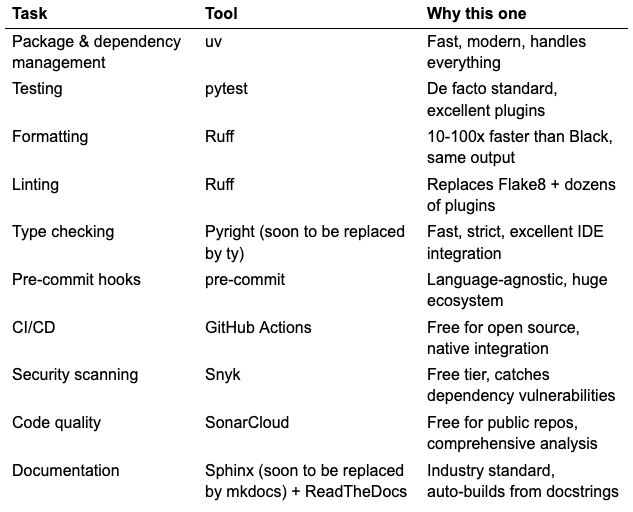
Quick reference: Tasks and tools
This table contains the tools I currently use. There now seems to be a Pyright alternative available, ty, which I still need to give a go; I will also replace Sphinx by mkdocs soon.
1. Make your package installable
Why this matters
The most fundamental requirement for any package is that someone else can install it. If installation is flaky, e.g., if it requires manual steps, undocumented system dependencies, or careful version pinning, adoption will suffer. A properly configured package can be installed with a single command and its dependencies are resolved automatically.
The Tool: uv
uv is a Rust-based package and project manager that is 10–100x faster than pip and poetry. It handles virtual environments, dependency resolution, lock files and publishing to PyPI. It uses pyproject.toml as the single source of truth for your package metadata.
A pyproject.toml could look like this (from the bada package):
[project]
name = "bada"
version = "0.1.1"
description = "Package for analysis of biophysical assays, such as DSF"
readme = "README.md"
authors = [
 { name = "Willi Gottstein", email = "willi.gottstein@gmail.com" }
]
requires-python = ">=3.12"
dependencies = [
 "dtaidistance>=2.3.13",
 "numpy>=2.2.3",
 "pandas>=2.2.3",
 "pandera>=0.23.0",
 "plotly>=6.0.0",
 "scipy>=1.15.2",
]

[build-system]
requires = ["hatchling"]
build-backend = "hatchling.build"

[dependency-groups]
dev = [
 "pyright>=1.1.396",
 "pytest-cov>=6.0.0",
 "pytest-mock>=3.14.0",
 "pytest>=8.3.5",
 "ruff>=0.9.9",
 "pre-commit>=4.1.0",
]
docs = [
 "sphinx>=7.0",
 "sphinx-autodoc-typehints>=1.24",
 "furo>=2023.9.10",
 "myst-parser>=2.0",
]
The lock file
uv generates a uv.lock file that pins exact versions of all dependencies (including transitive ones). Commit this file to version control. It ensures that everyone (and every CI run) uses identical dependency versions.
Key Commands
# Initialize a new project
uv init my-project

# Add a dependency
uv add requests

# Add a dev dependency
uv add --dev pytest

# Sync your environment with the lock file
uv sync

# Run a command in the project environment
uv run pytest
Publishing configuration
If you plan to publish to PyPI (and test on TestPyPI first), add an index configuration:
[[tool.uv.index]]
name = "testpypi"
url = "https://test.pypi.org/simple/"
publish-url = "https://test.pypi.org/legacy/"
explicit = true # Don’t use for dependency resolution
The explicit = true setting is important: it prevents uv from trying to resolve dependencies from TestPyPI (which has incomplete packages), while still allowing you to publish there.
Learn more
uv: An In-Depth Guide (SaaS Pegasus)
Managing Python Projects With uv (Real Python)
Python Packaging User Guide: pyproject.toml
2. Add tests
Why this matters
Tests are your safety net. They let you refactor with confidence, catch regressions before users do and serve as executable documentation of how your code is supposed to behave. Without tests, every change is a gamble.
Software testing encompasses various types; I usually focus on those three:
- Unit tests verify individual functions or methods in isolation. Every package should have these.
- Integration tests verify that components work together correctly.
- End-to-end tests verify the system as a whole.
You don’t need 100% code coverage, but your core functionality should be tested thoroughly. A good heuristic: if a function is important enough to exist, it’s important enough to test.
The tool: Pytest
Pytest is the de facto standard for Python testing. There are other options, such as the built-in unittest, but I find Pytest more concise, it has better output and also has a rich plugin ecosystem.
def test_get_normalized_signal(self, sample_fluorescence: np.ndarray) -> None:
  """Test that normalization maps signal to [0, 1] range."""
   normalized = get_normalized_signal(sample_fluorescence)

  # Check bounds
   assert np.min(normalized) == pytest.approx(0.0)
   assert np.max(normalized) == pytest.approx(1.0)

  # Check shape preservation
   assert normalized.shape == sample_fluorescence.shape
Key Commands
# Run all tests
uv run pytest

# Run with verbose output
uv run pytest -v

# Run a specific file
uv run pytest tests/test_dsf_analysis.py

# Run tests matching a pattern
uv run pytest -k "test_calculate"

# Stop on first failure
uv run pytest -x

# Show coverage report
uv run pytest --cov=src/bada --cov-report=term-missing
Learn More
Effective Python Testing With pytest (Real Python)
A Beginner’s Guide to Unit Testing with Pytest (Better Stack)
Python Unit Testing Best Practices (Pytest with Eric)
3. Enforce Consistent Formatting
Why this matters
Consistent formatting eliminates an entire category of code review comments (“add a space here,” “remove this blank line”). It makes diffs cleaner, reduces merge conflicts and lets everyone focus on what the code does rather than how it looks.
The key is that formatting should be automatic. Developers shouldn’t have to think about it, the tool handles it. The details of the style do no really matter; it’s consistency that matters.
The Tool: Ruff
Ruff is an extremely fast Python linter (see below) and formatter written in Rust. It’s a drop-in replacement for Black (formatter), isort (import sorting) and dozens of Flake8 plugins. On large codebases, Ruff is often 100x faster than the tools it replaces.
# pyproject.toml
[tool.ruff]
line-length = 100
fix = true

exclude = [
 ".venv",
 "__pypackages__",
 "_build",
 "build",
 "dist",
]

[tool.ruff.format]
skip-magic-trailing-comma = false
quote-style = "double"
indent-style = "space"
line-ending = "auto"
Key Commands
# Format all files
uv run ruff format .

# Check formatting without making changes
uv run ruff format --check .

# See what would change
uv run ruff format --diff .
Learn More
Ruff: A Modern Python Linter (Real Python)
The Ruff Formatter Documentation
4. Use linting
Why this matters
Linting (read here about the origin of the name) catches bugs before the code is even run. It identifies unused imports, undefined variables, unreachable code and common mistakes. It also enforces best practices, e.g. not using mutable default arguments, that prevent subtle issues.
Linting is especially valuable with AI-generated code. LLMs can produce code that looks correct but has issues a linter will catch immediately.
The Tool: Ruff (again!)
As discussed above, Ruff isn’t just a formatter but also a linter. It supports over 800 rules and runs in milliseconds.
# pyproject.toml
[tool.ruff.lint]
select = ["E", "F", "I"] # pycodestyle errors, Pyflakes, isort
fixable = ["I"] # Auto-fix import sorting
extend-fixable = ["I"]

[tool.ruff.lint.per-file-ignores]
“__init__.py” = ["F401"] # Allow unused imports in __init__.py

[tool.ruff.lint.isort]
known-first-party = ["bada"]
force-sort-within-sections = true
combine-as-imports = true
The known-first-party setting tells Ruff which imports belong to your package, ensuring they are grouped correctly.
Key Commands
# Check for lint errors
uv run ruff check .

# Fix auto-fixable errors
uv run ruff check --fix .

# Show explanation for a rule
uv run ruff rule F401
Learn more
Linting with Ruff (Better Stack)
5. Apply type checking
Why this matters
Python’s dynamic typing is flexible, but it can also hide bugs. Type hints document expected types and let static analyzers catch mismatches before runtime. They also improve IDE support: autocompletion, refactoring and documentation all benefit from type information.
Type hints are particularly valuable in larger codebases and teams. They serve as machine-checkable documentation of your code’s contracts.
The Tool: Pyright
Pyright is a fast, strict type checker from Microsoft. It powers the Pylance extension in VS Code and can run as a standalone CLI tool. It’s significantly faster than mypy and often catches more issues. There is now also another Ruff-based tool available: ty which seems even faster. Still need to test it!
def get_tm(
 temperature: np.ndarray | pd.Series, fluorescence: np.ndarray | pd.Series, **kwargs
) -> tuple[float, float]:
   """Get melting temperature (Tm) from signal"""
   spline, x_spline, _ = get_spline(temperature, fluorescence, **kwargs)
   max_derivative_value, tm = _get_max_derivative(spline, x_spline)

  return (tm, max_derivative_value)
Configuration
You can configure Pyright in pyproject.toml:
[tool.pyright]
include = ["src"]
exclude = [".venv"]
venvPath = "."
venv = ".venv"
reportMissingImports = true
reportMissingTypeStubs = false
pythonVersion = "3.13"
typeCheckingMode = "basic"
The typeCheckingMode has three levels:
— “off”: No type checking
— “basic”: Catches common errors (good starting point)
— “strict”: Comprehensive checking (can be overwhelming for existing codebases)
Key Commands
# Check all files
uv run pyright

# Check specific files
uv run pyright src/my_package/core.py

# Watch mode for continuous checking
uv run pyright --watch
Learn More
Introduction to Pyright (Better Stack)
Type Hinting & Type Checking (Substack)
6. Perform security scans
Why this matters
Your code depends on third-party packages and those packages have vulnerabilities. New CVEs are discovered regularly. Security scanning identifies known vulnerabilities in your dependencies before attackers can exploit them.
The Tools: Snyk and SonarCloud
Snyk scans your dependencies for known vulnerabilities and suggests fixes. It’s free for open-source projects and integrates with GitHub to scan pull requests automatically.
SonarCloud performs static analysis to find security issues, bugs and code smells in your own code. It’s free for public GitHub repositories.
I use both tools currently only as part of my CI pipeline (see section below).
Learn More
SonarCloud Python Documentation
SonarCloud Tutorial (SoftwareTestingHelp)
7. Analyze code quality
Why This Matters
Linting catches syntax issues and style violations. Security scanning catches vulnerabilities. But neither tells you whether your code is maintainable. Code quality analysis goes deeper: it measures complexity, detects duplications, identifies code smells and tracks technical debt over time.
This matters especially as projects grow. A function that’s merely “long” isn’t a linting error, but a function with cyclomatic complexity of 47 is a maintenance nightmare waiting to happen. Code quality tools quantify these risks and help you address them before they compound.
For teams, code quality metrics provide an objective basis for technical discussions. Instead of “this feels too complex,” you can say “this module has a maintainability rating of C and 3 hours of estimated technical debt.”
The Tool: SonarCloud (again!)
SonarCloud provides comprehensive code quality analysis for free on public repositories. It tracks:
- Bugs: Code that is demonstrably wrong or will cause unexpected behavior
- Vulnerabilities: Security issues in your own code (not just dependencies)
- Code smells: Maintainability issues that make code harder to understand or change
- Duplications: Repeated code blocks that should be refactored
- Coverage: How much of your code is exercised by tests
- Technical debt: Estimated time to fix all maintainability issues
SonarCloud integrates with GitHub to analyze every pull request and can block merges that introduce new issues or decrease coverage. For open source projects its functionality seems sufficient; for teams working on huge code bases (and who have budget!), Sigrid could be a nice alternative as it also analyzes the architecture and other things which seem out of scope for SonarCloud.
SonarCloud provides summary reports like this:
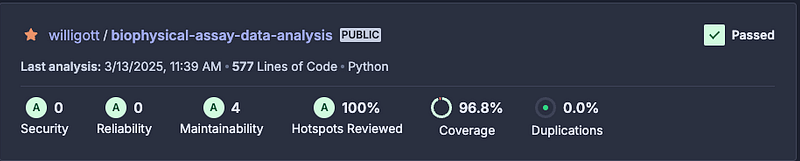 Some basic info SonarCloud provides, one can zoom into each of these aspects to get more info.
In this case, there are 4 minor issues regarding maintainability. SonarCloud then also allows you to view these issues in your code base and it also makes suggestions on how to fix them.
There is a wide range of measures SonarCloud looks into:
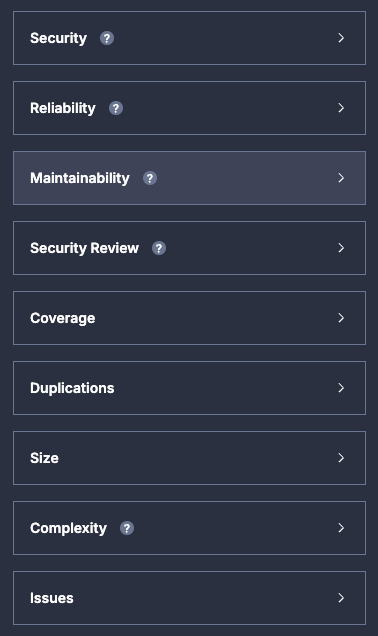
For all of those measures one can get ratings and suggestions on how to improve, if needed.
8. Check before you push: pre-commit hooks
Why this matters
Pre-commit hooks run checks automatically before every commit. If a check fails, the commit is blocked until you fix the issue. This catches problems at the earliest possible moment: before they enter version control, before CI runs and before anyone else sees them.
The Tool: pre-commit
The pre-commit framework manages and runs hooks from a straightforward YAML configuration. It supports hooks written in any language and has a large ecosystem of ready-to-use hooks.
# .pre-commit-config.yaml
repos:
 — repo: https://github.com/astral-sh/uv-pre-commit
 rev: 0.7.21
 hooks:
 — id: uv-lock # Ensures lock file is up to date

 — repo: https://github.com/astral-sh/ruff-pre-commit
 rev: v0.9.9
 hooks:
 — id: ruff # Linting
 — id: ruff-format # Formatting

 — repo: https://github.com/RobertCraigie/pyright-python
 rev: v1.1.396
 hooks:
 — id: pyright # Type checking
This configuration is minimal but comprehensive: it ensures your lock file stays current, code is linted and formatted and types are checked: all before you can commit. I typically keep the checks rather lightweight; of course, you could also add testing and code quality checks (or whatever else you prefer), but it makes committing potentially a lengthy and (too) annoying process.
Setup
# Install pre-commit
uv add --dev pre-commit

# Install the git hooks
uv run pre-commit install

# Run against all files (useful for first-time setup)
uv run pre-commit run --all-files
How It Works
After setup, every git commit will automatically run the configured hooks:
$ git commit -m "Add new feature"
uv-lock……………………………………………………………Passed
ruff……………………………………………………………Passed
ruff-format……………………………………………………..Passed
pyright…………………………………………………………Passed
If any hook fails, the commit is aborted. Fix the issues and try again.
Learn More
How to Set Up Pre-Commit Hooks (Stefanie Molin)
Git Hooks (Atlassian Tutorial)
9. Automate with Continuous Integration (CI)
Why this matters
Pre-commit hooks are great, but they can be skipped (git commit — no-verify). CI runs on a server and cannot be bypassed. It ensures that every pull request and every merge to main passes all checks, regardless of what individual developers do locally.
CI also runs checks that can be too slow for pre-commit (like full test suites) and provides a shared, reproducible environment for verification.
The Tool: GitHub Actions
GitHub Actions is free for public repositories and integrates directly with GitHub’s pull request workflow. You define workflows in YAML files and they run automatically on push, pull request, or other triggers.
# .github/workflows/code_quality.yaml
name: Code Quality

on: [push, pull_request]
jobs:
 lock-file:
 runs-on: ubuntu-latest
 steps:
 — uses: actions/checkout@v4
 — uses: ./.github/actions/setup
 — run: uv lock — locked
linting:
 runs-on: ubuntu-latest
 needs: [lock-file]
 steps:
 — uses: actions/checkout@v4
 — uses: ./.github/actions/setup
 — run: uvx ruff check .
formatting:
 runs-on: ubuntu-latest
 needs: [lock-file]
 steps:
 — uses: actions/checkout@v4
 — uses: ./.github/actions/setup
 — run: uvx ruff format — check .
type-checking:
 runs-on: ubuntu-latest
 needs: [lock-file]
 steps:
 — uses: actions/checkout@v4
 — uses: ./.github/actions/setup
 — run: uv run pyright .
testing:
 runs-on: ubuntu-latest
 needs: [lock-file]
 strategy:
 matrix:
 python-version: ['3.12', '3.13']
 steps:
 — uses: actions/checkout@v4
 — name: Set up Python ${{ matrix.python-version }}
 uses: actions/setup-python@v4
 with:
 python-version: ${{ matrix.python-version }}
 — uses: ./.github/actions/setup
 — run: uv run pytest -v — durations=0 — cov — cov-report=xml
 — name: Upload coverage to Codecov
 uses: codecov/codecov-action@v4
 with:
 token: ${{ secrets.CODECOV_TOKEN }}
 — name: Upload coverage report
 uses: actions/upload-artifact@v4
 with:
 name: coverage-report-${{ matrix.python-version }}
 path: coverage.xml
security:
 name: Snyk scan
 runs-on: ubuntu-latest
 needs: [linting, formatting, type-checking, testing]
 steps:
 — uses: actions/checkout@master
 — name: Run Snyk to check for vulnerabilities
 uses: snyk/actions/python@master
 env:
 SNYK_TOKEN: ${{ secrets.SNYK_TOKEN }}
 with:
 args: — severity-threshold=medium
sonarcloud:
 name: SonarCloud
 runs-on: ubuntu-latest
 needs: [linting, formatting, type-checking, testing, security]
 steps:
 — uses: actions/checkout@v4
 with:
 fetch-depth: 0
 — name: Download coverage report
 uses: actions/download-artifact@v4
 with:
 name: coverage-report-3.13
 — name: SonarCloud Scan
 uses: SonarSource/sonarqube-scan-action@master
 env:
 GITHUB_TOKEN: ${{ secrets.GITHUB_TOKEN }}
 SONAR_TOKEN: ${{ secrets.SONAR_TOKEN }}
 with:
 args: >
 -Dsonar.python.coverage.reportPaths=coverage.xml
A few things to note about this workflow:
- Job dependencies: The needs keyword creates a pipeline where jobs run in sequence. Linting and formatting don’t need to wait for each other, but security scanning waits for all quality checks to pass. Obviously, you can have a different order. If all goes well, you will see the following:
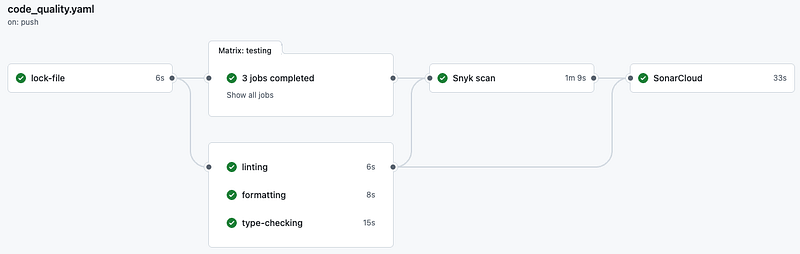
- uvx vs. uv run: uvx runs tools directly without installing them into your project. It’s great for one-off tool execution.
- Coverage artifacts: The testing job uploads coverage reports as artifacts, which the SonarCloud job downloads later.
The reusable composite action for uv setup:
# .github/actions/setup/action.yaml
name: "install uv"
runs:
 using: "composite"
 steps:
 — name: Install uv
 uses: astral-sh/setup-uv@v5
 with:
 version: "0.7.21"
This keeps your workflows DRY as it updates the uv version in one place.
Pull request checks
When configured properly, GitHub will show check status on every pull request:
✓ All checks have passed ✓ lock-file ✓ linting ✓ formatting ✓ type-checking ✓ testing (3.12) ✓ testing (3.13) ✓ security ✓ sonarcloud
You can require these checks to pass before merging (Settings → Branches → Branch protection rules).
Bonus: automated release workflow
Once your CI passes, you can automate publishing to PyPI on release:
# .github/workflows/release.yaml
name: Release
on:
 release:
 types: [published]
jobs:
 build:
 name: Build Package
 runs-on: ubuntu-latest
 steps:
 — uses: actions/checkout@v4
 — uses: ./.github/actions/setup
 — run: uv build — no-sources
 — name: Store built package
 uses: actions/upload-artifact@v4
 with:
 name: dist
 path: dist/
 retention-days: 7
publish-testpypi:
 name: Publish to TestPyPI
 needs: [build]
 if: ${{ github.event_name == ‘release’ && github.event.action == ‘published’ }}
 runs-on: ubuntu-latest
 environment: release-testpypi
 permissions:
 id-token: write # Required for trusted publishing
 steps:
 — uses: actions/checkout@v4
 — uses: ./.github/actions/setup
 — name: Download built package
 uses: actions/download-artifact@v4
 with:
 name: dist
 path: dist/
 — name: Publish to TestPyPI
 run: uv publish — index testpypi dist/*
publish-pypi:
 name: Publish to PyPI
 needs: [publish-testpypi]
 if: ${{ github.event_name == ‘release’ && github.event.action == ‘published’ }}
 runs-on: ubuntu-latest
 environment: release-pypi
 permissions:
 id-token: write # Required for trusted publishing
 steps:
 — uses: actions/checkout@v4
 — uses: ./.github/actions/setup
 — name: Test installation from TestPyPI
 run: uv pip install — system -i https://test.pypi.org/simple/ — extra-index-url https://pypi.org/simple bada
 — name: Download built package
 uses: actions/download-artifact@v4
 with:
 name: dist
 path: dist/
 — name: Publish to PyPI
 run: uv publish dist/*
This workflow:
1. Builds the package once and stores it as an artifact
2. Publishes to TestPyPI first as a safety check
3. Tests installation from TestPyPI before publishing to the real PyPI
4. Publishes to PyPI only if TestPyPI succeeded
The id-token: write permission enables trusted publishing — no API tokens needed.
Learn More
Building and Testing Python (GitHub Docs)
CI/CD for Python With GitHub Actions (Real Python)
10. Write and publish documentation
Why this matters
Documentation is often the first thing potential users see. Good documentation answers “what does this do?” and “how do I use it?” without requiring users to read source code. For libraries, comprehensive API documentation is expected.
The Tools: Sphinx + ReadTheDocs
Sphinx generates documentation from reStructuredText or Markdown files and can automatically extract docstrings from your code. ReadTheDocs hosts the documentation for free and rebuilds it automatically when you push changes. I will probably soon change to mkdocs, but for now Sphinx still does the job…
Configuration
# docs/conf.py
project = "bada"
copyright = "2025, willigott"
author = "willigott"

extensions = [
 "sphinx.ext.autodoc",
 "sphinx.ext.napoleon", # Google/NumPy style docstrings
 "sphinx.ext.viewcode", # Add links to source code
 "myst_parser", # Markdown support
]

html_theme = "furo" # Modern, clean theme

# Napoleon settings for NumPy-style docstrings
napoleon_google_docstring = False
napoleon_numpy_docstring = True
ReadTheDocs Setup
1. Create .readthedocs.yaml in your repository root:
version: 2
build:
 os: ubuntu-22.04
 tools:
 python: "3.11"
sphinx:
 configuration: docs/conf.py
python:
 install:
 — requirements: docs/requirements.txt
 — method: pip
 path: .
2. Sign up at readthedocs.org and import your repository
3. Documentation will build automatically on every push
Learn More
A “How to” Guide for Sphinx + ReadTheDocs
Documenting Python with Sphinx (Python for the Lab)
Conclusion
The practices in this post are not “the one true way”; it’s just what I have converged on and can be adapted to your specific needs. The tools will evolve, e.g. uv and Ruff are relatively new and even better options may emerge, but the underlying principles remain:
- Make installation reproducible with lock files and clear dependency specifications
- Automate quality checks so humans don’t have to remember them and to allow AI coding assistants to fix their own output automatically
- Catch issues early with pre-commit hooks and CI
- Document your work so others (including future you) can use it
- Design for change with clear responsibilities and minimal coupling (not covered in this post though)
The investment in setting this up pays dividends every time someone installs your package without issues, every time CI catches a bug before users do and every time a contributor can confidently make changes knowing the test suite has their back.