 https://github.com/bad-day/TelegramTUI
In this article I will talk about the npyscreen — library for creating console applications.
Install
The package is available for download on PyPI.
sudo pip3 install npyscreenObject types
Npyscreen uses 3 basic types of objects:
- Application objects — provide start and end of the application, create forms, process events. Basically used NPSAppManaged and StandardApp (with event support).
- Form objects is the area of the screen that contains widgets. Main forms: - FormBaseNew — Empty forms. - Form — Form with the button «ok». - ActionForm — Form with two buttons: “ok” and “cancel”. - FormWithMenus — Form that supports the menu.
- Widget Objects contains various elements located on the forms Some widgets: - Textfield, PasswordEntry, MultiLineEdit, FilenameCombo —Input forms. - DateCombo, ComboBox, FilenameCombo — Drop-down lists. - MultiSelect, MultiSelect, BufferPager — Picking Options. - Slider, TitleSlider —Sliders.
More information can be found on the official website with the documentation.
Hello world
The best way to create forms is to inherit them from default classes. You can override the default methods to extend the functionality of the application.

#!/usr/bin/env python3
import npyscreen

class App(npyscreen.StandardApp):
    def onStart(self):
        self.addForm("MAIN", MainForm, name="Hello Medium!")

class MainForm(npyscreen.ActionForm):
    # Constructor
    def create(self):
        # Add the TitleText widget to the form
        self.title = self.add(npyscreen.TitleText, name="TitleText", value="Hello World!")
    # Override method that triggers when you click the "ok"
    def on_ok(self):
        self.parentApp.setNextForm(None)
    # Override method that triggers when you click the "cancel"
    def on_cancel(self):
        self.title.value = "Hello World!"

MyApp = App()
MyApp.run()
Elements location
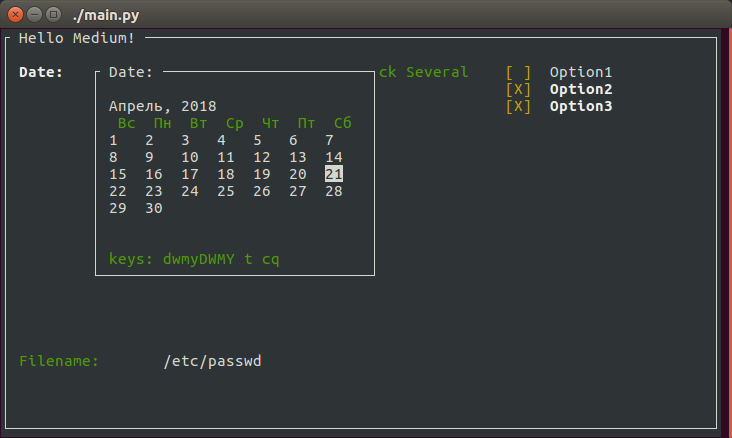
By default, widgets use the maximum possible space. To use custom coordinates, you need to change the parameters:
- relx, rely — the position of the widget relative to the origin of the form.
- width, height, max_width, max_height — limit of the widget size.
#!/usr/bin/env python3
import npyscreen

class App(npyscreen.StandardApp):
    def onStart(self):
        self.addForm("MAIN", MainForm, name="Hello Medium!")

class MainForm(npyscreen.FormBaseNew):
    def create(self):
        # Get the space used by the form
        y, x = self.useable_space()
        self.add(npyscreen.TitleDateCombo, name="Date:", max_width=x // 2)
        self.add(npyscreen.TitleMultiSelect, relx=x // 2 + 1, rely=2, value=[1, 2], name="Pick Several", values=["Option1", "Option2", "Option3"], scroll_exit=True)
        # You can use the negative coordinates
        self.add(npyscreen.TitleFilename, name="Filename:", rely=-5)

MyApp = App()
MyApp.run()#!/usr/bin/env python3
import npyscreen
class App(npyscreen.StandardApp):
def onStart(self):
self.addForm("MAIN", MainForm, name="Hello Medium!")
class MainForm(npyscreen.FormBaseNew):
def create(self):
# Get the space used by the form
y, x = self.useable_space()
self.add(npyscreen.TitleDateCombo, name="Date:", max_width=x // 2)
self.add(npyscreen.TitleMultiSelect, relx=x // 2 + 1, rely=2, value=[1, 2], name="Pick Several", values=["Option1", "Option2", "Option3"], scroll_exit=True)
# You can use the negative coordinates
self.add(npyscreen.TitleFilename, name="Filename:", rely=-5)
MyApp = App()
MyApp.run()#!/usr/bin/env python3
import npyscreen
class App(npyscreen.StandardApp):
def onStart(self):
self.addForm("MAIN", MainForm, name="Hello Medium!")
class MainForm(npyscreen.FormBaseNew):
def create(self):
# Get the space used by the form
y, x = self.useable_space()
self.add(npyscreen.TitleDateCombo, name="Date:", max_width=x // 2)
self.add(npyscreen.TitleMultiSelect, relx=x // 2 + 1, rely=2, value=[1, 2], name="Pick Several", values=["Option1", "Option2", "Option3"], scroll_exit=True)
# You can use the negative coordinates
self.add(npyscreen.TitleFilename, name="Filename:", rely=-5)
MyApp = App()
MyApp.run()#!/usr/bin/env python3
import npyscreen
class App(npyscreen.StandardApp):
def onStart(self):
self.addForm("MAIN", MainForm, name="Hello Medium!")
class MainForm(npyscreen.FormBaseNew):
def create(self):
# Get the space used by the form
y, x = self.useable_space()
self.add(npyscreen.TitleDateCombo, name="Date:", max_width=x // 2)
self.add(npyscreen.TitleMultiSelect, relx=x // 2 + 1, rely=2, value=[1, 2], name="Pick Several", values=["Option1", "Option2", "Option3"], scroll_exit=True)
# You can use the negative coordinates
self.add(npyscreen.TitleFilename, name="Filename:", rely=-5)
MyApp = App()
MyApp.run()Boxes and custom highlightings
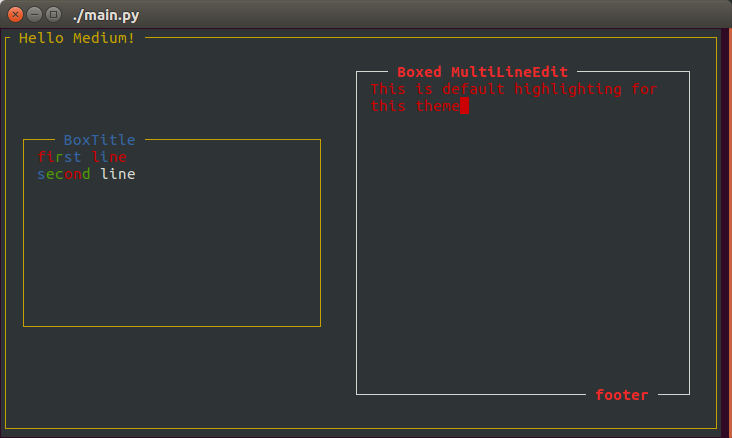
To make a wrapper in the form of boxing is simple —you need create a class inherited from BoxTitle and to override the attribute _contained_widget, putting their the widget that will be inside. There are several default color themes available in npyscreen. If you want, you can add your own. You can install them using the setTheme method. Customize text highlighting is not so simple. I expanded the functionality of the library to make it work.
#!/usr/bin/env python3
from src import npyscreen
import random

class App(npyscreen.StandardApp):
    def onStart(self):
        # Set the theme. DefaultTheme is used by default
        npyscreen.setTheme(npyscreen.Themes.ColorfulTheme)
        self.addForm("MAIN", MainForm, name="Hello Medium!")

class InputBox(npyscreen.BoxTitle):
    # MultiLineEdit now will be surrounded by boxing
    _contained_widget = npyscreen.MultiLineEdit

class MainForm(npyscreen.FormBaseNew):
    def create(self):
        y, x = self.useable_space()
        obj = self.add(npyscreen.BoxTitle, name="BoxTitle",
              custom_highlighting=True, values=["first line", "second line"],
              rely=y // 4, max_width=x // 2 - 5, max_height=y // 2)
        self.add(InputBox, name="Boxed MultiLineEdit", footer="footer",
              relx=x // 2, rely=2)

        color1 = self.theme_manager.findPair(self, 'GOOD')
        color2 = self.theme_manager.findPair(self, 'WARNING')
        color3 = self.theme_manager.findPair(self, 'NO_EDIT')

        color_list = [color1, color2, color3]
        first_line_colors = [random.choice(color_list) for i in range(len("first line"))]
        second_line_colors = [random.choice(color_list) for i in range(len("second"))]
        # Fill the lines with custom colors
        obj.entry_widget.highlighting_arr_color_data = [first_line_colors, second_line_colors]

MyApp = App()
MyApp.run()#!/usr/bin/env python3
from src import npyscreen
import random
class App(npyscreen.StandardApp):
def onStart(self):
# Set the theme. DefaultTheme is used by default
npyscreen.setTheme(npyscreen.Themes.ColorfulTheme)
self.addForm("MAIN", MainForm, name="Hello Medium!")
class InputBox(npyscreen.BoxTitle):
# MultiLineEdit now will be surrounded by boxing
_contained_widget = npyscreen.MultiLineEdit
class MainForm(npyscreen.FormBaseNew):
def create(self):
y, x = self.useable_space()
obj = self.add(npyscreen.BoxTitle, name="BoxTitle",
custom_highlighting=True, values=["first line", "second line"],
rely=y // 4, max_width=x // 2 - 5, max_height=y // 2)
self.add(InputBox, name="Boxed MultiLineEdit", footer="footer",
relx=x // 2, rely=2)
color1 = self.theme_manager.findPair(self, 'GOOD')
color2 = self.theme_manager.findPair(self, 'WARNING')
color3 = self.theme_manager.findPair(self, 'NO_EDIT')
color_list = [color1, color2, color3]
first_line_colors = [random.choice(color_list) for i in range(len("first line"))]
second_line_colors = [random.choice(color_list) for i in range(len("second"))]
# Fill the lines with custom colors
obj.entry_widget.highlighting_arr_color_data = [first_line_colors, second_line_colors]
MyApp = App()
MyApp.run()#!/usr/bin/env python3
from src import npyscreen
import random
class App(npyscreen.StandardApp):
def onStart(self):
# Set the theme. DefaultTheme is used by default
npyscreen.setTheme(npyscreen.Themes.ColorfulTheme)
self.addForm("MAIN", MainForm, name="Hello Medium!")
class InputBox(npyscreen.BoxTitle):
# MultiLineEdit now will be surrounded by boxing
_contained_widget = npyscreen.MultiLineEdit
class MainForm(npyscreen.FormBaseNew):
def create(self):
y, x = self.useable_space()
obj = self.add(npyscreen.BoxTitle, name="BoxTitle",
custom_highlighting=True, values=["first line", "second line"],
rely=y // 4, max_width=x // 2 - 5, max_height=y // 2)
self.add(InputBox, name="Boxed MultiLineEdit", footer="footer",
relx=x // 2, rely=2)
color1 = self.theme_manager.findPair(self, 'GOOD')
color2 = self.theme_manager.findPair(self, 'WARNING')
color3 = self.theme_manager.findPair(self, 'NO_EDIT')
color_list = [color1, color2, color3]
first_line_colors = [random.choice(color_list) for i in range(len("first line"))]
second_line_colors = [random.choice(color_list) for i in range(len("second"))]
# Fill the lines with custom colors
obj.entry_widget.highlighting_arr_color_data = [first_line_colors, second_line_colors]
MyApp = App()
MyApp.run()#!/usr/bin/env python3
from src import npyscreen
import random
class App(npyscreen.StandardApp):
def onStart(self):
# Set the theme. DefaultTheme is used by default
npyscreen.setTheme(npyscreen.Themes.ColorfulTheme)
self.addForm("MAIN", MainForm, name="Hello Medium!")
class InputBox(npyscreen.BoxTitle):
# MultiLineEdit now will be surrounded by boxing
_contained_widget = npyscreen.MultiLineEdit
class MainForm(npyscreen.FormBaseNew):
def create(self):
y, x = self.useable_space()
obj = self.add(npyscreen.BoxTitle, name="BoxTitle",
custom_highlighting=True, values=["first line", "second line"],
rely=y // 4, max_width=x // 2 - 5, max_height=y // 2)
self.add(InputBox, name="Boxed MultiLineEdit", footer="footer",
relx=x // 2, rely=2)
color1 = self.theme_manager.findPair(self, 'GOOD')
color2 = self.theme_manager.findPair(self, 'WARNING')
color3 = self.theme_manager.findPair(self, 'NO_EDIT')
color_list = [color1, color2, color3]
first_line_colors = [random.choice(color_list) for i in range(len("first line"))]
second_line_colors = [random.choice(color_list) for i in range(len("second"))]
# Fill the lines with custom colors
obj.entry_widget.highlighting_arr_color_data = [first_line_colors, second_line_colors]
MyApp = App()
MyApp.run()Events and Handlers
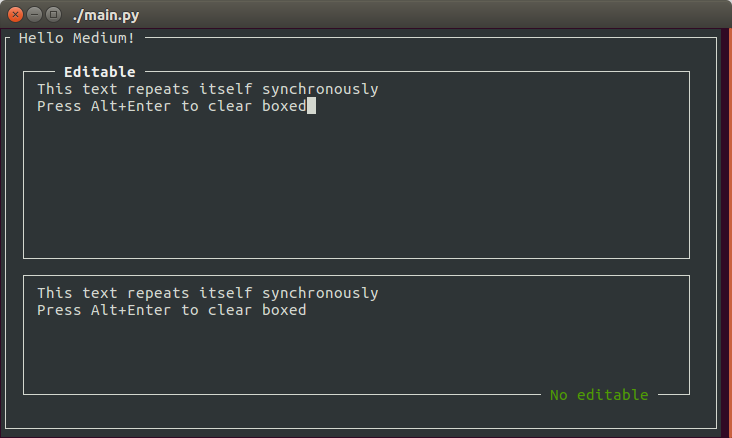
The StandardApp class in npyscreen supports the event queue. For the keypress handlers used add_handlers method.
#!/usr/bin/env python3
from src import npyscreen
import curses

class App(npyscreen.StandardApp):
    def onStart(self):
        self.addForm("MAIN", MainForm, name="Hello Medium!")

class InputBox1(npyscreen.BoxTitle):
    _contained_widget = npyscreen.MultiLineEdit
    def when_value_edited(self):
        self.parent.parentApp.queue_event(npyscreen.Event("event_value_edited"))

class InputBox2(npyscreen.BoxTitle):
    _contained_widget = npyscreen.MultiLineEdit

class MainForm(npyscreen.FormBaseNew):
    def create(self):
        self.add_event_hander("event_value_edited", self.event_value_edited)
        new_handlers = {
            # Set ctrl+Q to exit
            "^Q": self.exit_func,
            # Set alt+enter to clear boxes
            curses.ascii.alt(curses.ascii.NL): self.inputbox_clear
        }
        self.add_handlers(new_handlers)

        y, x = self.useable_space()
        self.InputBox1 = self.add(InputBox1, name="Editable", max_height=y // 2)
        self.InputBox2 = self.add(InputBox2, footer="No editable", editable=False)

    def event_value_edited(self, event):
        self.InputBox2.value = self.InputBox1.value
        self.InputBox2.display()

    def inputbox_clear(self, _input):
        self.InputBox1.value = self.InputBox2.value = ""
        self.InputBox1.display()
        self.InputBox2.display()

    def exit_func(self, _input):
        exit(0)

MyApp = App()
MyApp.run()#!/usr/bin/env python3
from src import npyscreen
import curses
class App(npyscreen.StandardApp):
def onStart(self):
self.addForm("MAIN", MainForm, name="Hello Medium!")
class InputBox1(npyscreen.BoxTitle):
_contained_widget = npyscreen.MultiLineEdit
def when_value_edited(self):
self.parent.parentApp.queue_event(npyscreen.Event("event_value_edited"))
class InputBox2(npyscreen.BoxTitle):
_contained_widget = npyscreen.MultiLineEdit
class MainForm(npyscreen.FormBaseNew):
def create(self):
self.add_event_hander("event_value_edited", self.event_value_edited)
new_handlers = {
# Set ctrl+Q to exit
"^Q": self.exit_func,
# Set alt+enter to clear boxes
curses.ascii.alt(curses.ascii.NL): self.inputbox_clear
}
self.add_handlers(new_handlers)
y, x = self.useable_space()
self.InputBox1 = self.add(InputBox1, name="Editable", max_height=y // 2)
self.InputBox2 = self.add(InputBox2, footer="No editable", editable=False)
def event_value_edited(self, event):
self.InputBox2.value = self.InputBox1.value
self.InputBox2.display()
def inputbox_clear(self, _input):
self.InputBox1.value = self.InputBox2.value = ""
self.InputBox1.display()
self.InputBox2.display()
def exit_func(self, _input):
exit(0)
MyApp = App()
MyApp.run()#!/usr/bin/env python3
from src import npyscreen
import curses
class App(npyscreen.StandardApp):
def onStart(self):
self.addForm("MAIN", MainForm, name="Hello Medium!")
class InputBox1(npyscreen.BoxTitle):
_contained_widget = npyscreen.MultiLineEdit
def when_value_edited(self):
self.parent.parentApp.queue_event(npyscreen.Event("event_value_edited"))
class InputBox2(npyscreen.BoxTitle):
_contained_widget = npyscreen.MultiLineEdit
class MainForm(npyscreen.FormBaseNew):
def create(self):
self.add_event_hander("event_value_edited", self.event_value_edited)
new_handlers = {
# Set ctrl+Q to exit
"^Q": self.exit_func,
# Set alt+enter to clear boxes
curses.ascii.alt(curses.ascii.NL): self.inputbox_clear
}
self.add_handlers(new_handlers)
y, x = self.useable_space()
self.InputBox1 = self.add(InputBox1, name="Editable", max_height=y // 2)
self.InputBox2 = self.add(InputBox2, footer="No editable", editable=False)
def event_value_edited(self, event):
self.InputBox2.value = self.InputBox1.value
self.InputBox2.display()
def inputbox_clear(self, _input):
self.InputBox1.value = self.InputBox2.value = ""
self.InputBox1.display()
self.InputBox2.display()
def exit_func(self, _input):
exit(0)
MyApp = App()
MyApp.run()#!/usr/bin/env python3
from src import npyscreen
import curses
class App(npyscreen.StandardApp):
def onStart(self):
self.addForm("MAIN", MainForm, name="Hello Medium!")
class InputBox1(npyscreen.BoxTitle):
_contained_widget = npyscreen.MultiLineEdit
def when_value_edited(self):
self.parent.parentApp.queue_event(npyscreen.Event("event_value_edited"))
class InputBox2(npyscreen.BoxTitle):
_contained_widget = npyscreen.MultiLineEdit
class MainForm(npyscreen.FormBaseNew):
def create(self):
self.add_event_hander("event_value_edited", self.event_value_edited)
new_handlers = {
# Set ctrl+Q to exit
"^Q": self.exit_func,
# Set alt+enter to clear boxes
curses.ascii.alt(curses.ascii.NL): self.inputbox_clear
}
self.add_handlers(new_handlers)
y, x = self.useable_space()
self.InputBox1 = self.add(InputBox1, name="Editable", max_height=y // 2)
self.InputBox2 = self.add(InputBox2, footer="No editable", editable=False)
def event_value_edited(self, event):
self.InputBox2.value = self.InputBox1.value
self.InputBox2.display()
def inputbox_clear(self, _input):
self.InputBox1.value = self.InputBox2.value = ""
self.InputBox1.display()
self.InputBox2.display()
def exit_func(self, _input):
exit(0)
MyApp = App()
MyApp.run()Links
Official documentation. Official source code. Telegram client written on npyscreen (Which is on the first screenshot). Updated with me repository (the main repository does not contributing).